Daily checks
The morning routine starts on the Dashboard and drops into four reports when something needs a closer look. It takes a few minutes and catches nearly everything before it becomes a problem. A manager or whoever opens the store runs it.
Start on the Dashboard
Signing in lands you on the Dashboard. The line under its title sums up what is waiting, for example "3 forms open, 2 transfers waiting on pickup, and 1 A&D record not in the bound book yet." When nothing is, it reads "Nothing is waiting on anyone right now." Each block only shows to roles that may open what it lists.
Open 4473s. Background checks started, gun not yet transferred: the same orders as the Pending 4473 Orders report. Tabs split them: Ready (NICS Proceed), Delayed, In progress (no NICS result yet), and All, the only tab that also shows Denied and Cancelled. Each row opens the order with Complete, Continue or View. All records opens 4473 records.
Waiting on pickup. Customers' transfer guns, oldest first. A gun in the store more than 21 days turns amber. View all N opens Pending Transfer Pickups.
A&D. Today's Acquired and Disposed counts, and Not logged: bound-book records submitted more than 15 minutes ago that FastBound does not have yet. Click Review N not logged to list them. A Will retry row is pushed again by the daily retry. A Needs a person row will not clear itself. Open it and follow What to do when a push fails. With FastBound switched off, the block reads FastBound off.
Check the notifications bell too. It holds each NICS result and any record FastBound refused for good.
The routine
| Order | Check | Looking for |
|---|---|---|
| 1 | Pending 4473 Orders | Customers to call, Brady dates that have arrived |
| 2 | Pending Transfer Pickups | Customers' guns nobody has collected |
| 3 | Hand-Asserted 4473 Dispositions | Overrides and paper attestations to review |
| 4 | Firearms In Stock vs FastBound | Guns the two books disagree about |
Items 1 and 2 are daily, and the Dashboard blocks above are their summary. Item 3 is at least weekly, and daily is better. Item 4 is weekly, or whenever an alert points at it.
1. Pending 4473 Orders
The morning call list. Every draft order carrying a regulated firearm, oldest first. It is not in the sidebar: open it from the Dashboard under All records → Compliance → Pending 4473 orders.
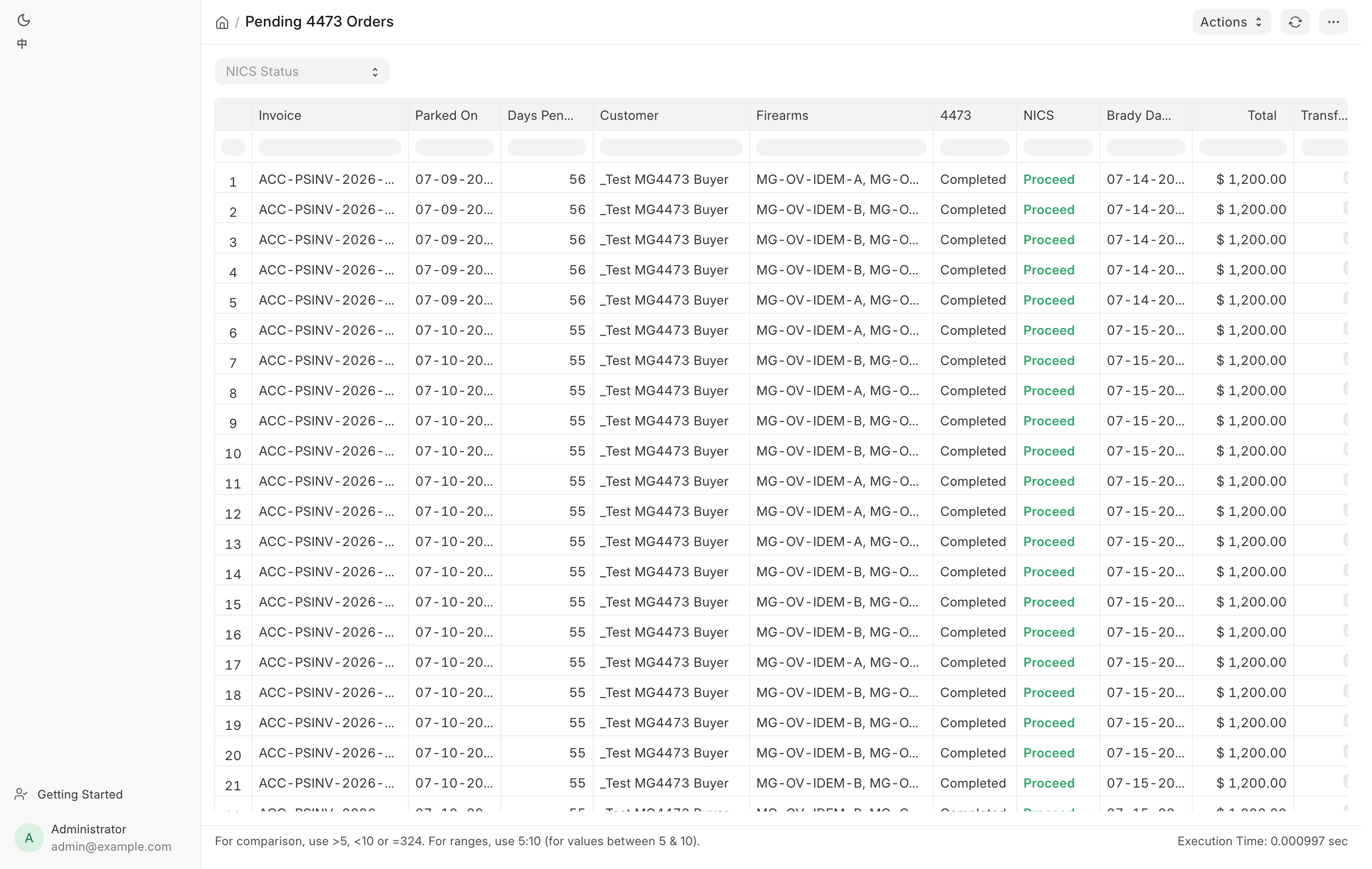
Work it in three passes:
- Denied. The NICS cell is red. The sale cannot go ahead. A manager refunds the card or returns the cash, then deletes the draft.
- Delayed with an orange Brady Day 3. The third business day has arrived and the check is still delayed. Federal law lets the dealer transfer at their discretion from that point. Decide, and call the customer either way.
- 4473 still Pending. Nobody finished the form. Call the customer, or chase whoever left it open.
Use the NICS Status filter to take one outcome at a time. Days Pending counts calendar days since the check started; Brady Day 3 counts three business days, stepping over weekends but not holidays.
A ticked Transfer? means the row is a customer transfer-in rather than a sale. The gun is already the customer's, so the conversation is different.
An order nobody is coming back for can be cleared by a manager with Clear Abandoned Order…. Detail, the Check FastBound filter and the FB Pending Disp. column are on Form 4473 and NICS.
To confirm a 4473 that is no longer on this list was completed, look it up in 4473 records.
2. Pending Transfer Pickups
Customers' guns sitting in the safe, oldest first. Every row is somebody else's property that the store is holding. Open it from the sidebar under Compliance → Transfer pickups. Counter accounts with the Sales User role can open it.
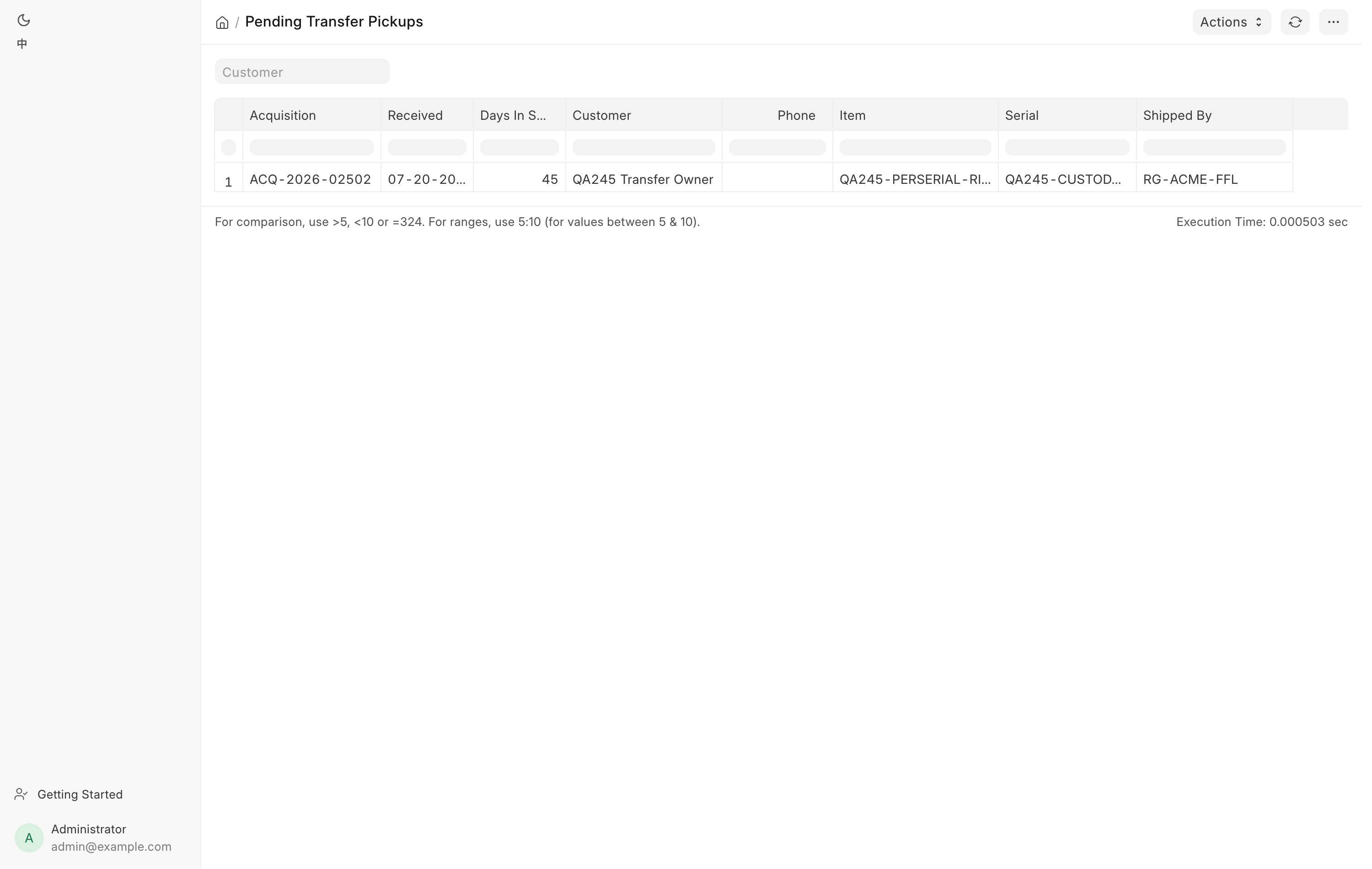
| Column | Use |
|---|---|
| Acquisition | The bound-book record. |
| Received | When the gun arrived. |
| Days In Store | Calendar days since. |
| Customer | Who to ring. |
| Phone | Their mobile number, blank when none is on file. |
| Item, Serial | Which gun. |
| Shipped By | Which dealer sent it. |
A row appears once a transfer has been received with a Transfer for Customer named, and disappears the moment the gun leaves stock. So the list clears itself when the customer collects.
Ring the top of the list. A gun with a high Days In Store is one nobody has chased, and a blank Phone is a customer record that needs fixing before it can be chased at all.
Filter by Customer when somebody rings you.
3. Hand-Asserted 4473 Dispositions
Every bound-book disposition somebody asserted rather than one FastBound committed. Two things land here: a manager's 4473 override, and a paper 4473 recorded at the counter.
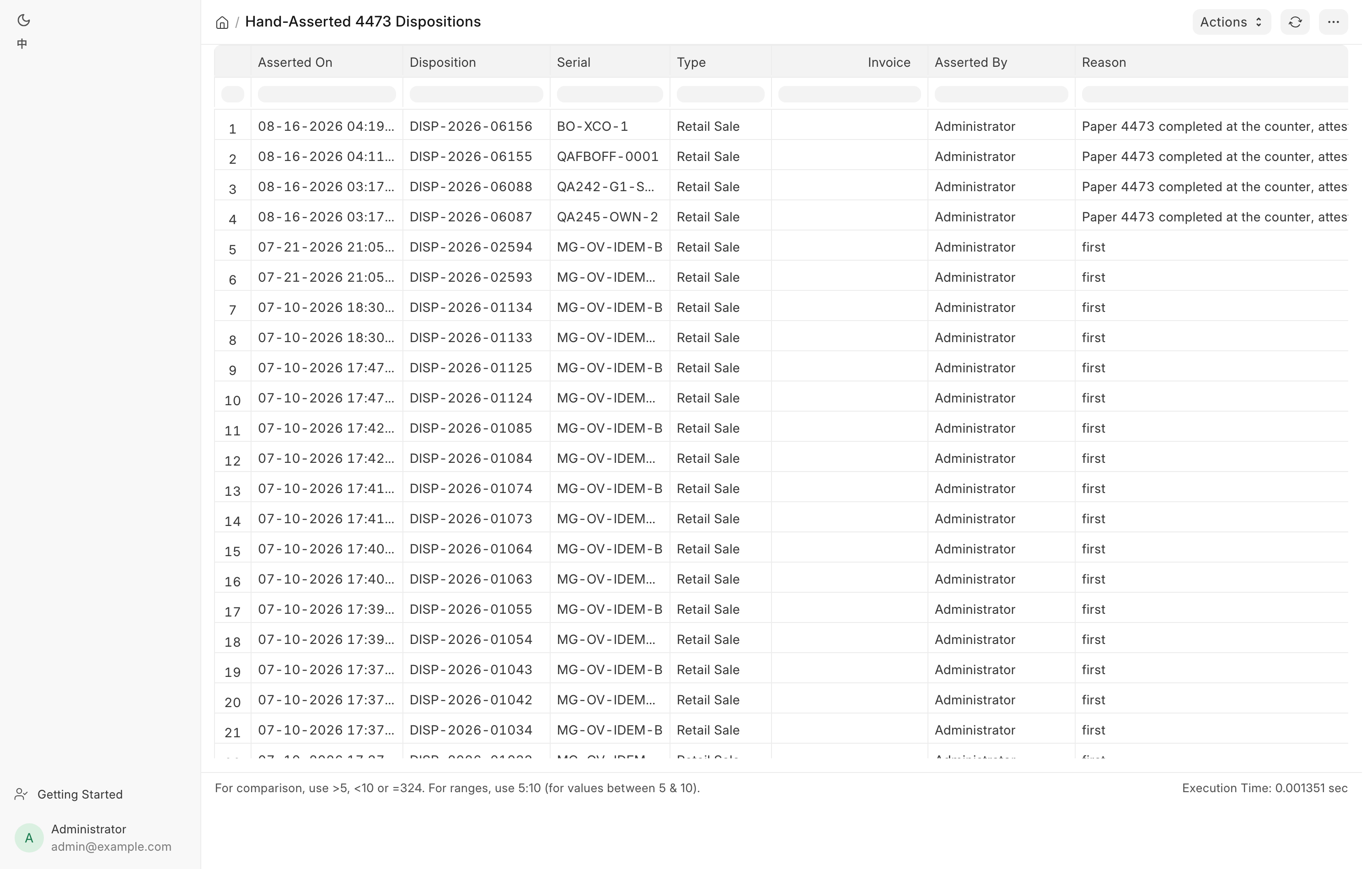
The columns are Asserted On, Disposition, Serial, Type, Invoice, Asserted By, Reason and FastBound ID. Newest first, capped at 500 rows. There are no filters. It is visible to System Manager and Sales Manager only.
It has no link in the sidebar or on the Dashboard. Type Hand-Asserted 4473
Dispositions into the search bar at the top of the desk, or go to
/app/query-report/Hand-Asserted 4473 Dispositions. The same forms appear in
4473 records filtered to Source Paper / override, which also
shows forms whose order was later deleted or redone.
Read each new row and ask three questions:
- Does the reason make sense? "FastBound down, form completed on the terminal" is a reason. A blank-looking one-word reason is not.
- Is the pattern normal? One override in a month is an incident. Several a week from one person is a habit worth a conversation.
- Did FastBound catch up? An empty FastBound ID means the bound book there still does not carry this disposition. In paper mode that stays empty by design. With FastBound running, an empty one after the fact means somebody needs to reconcile.
This is the whole control
An asserted disposition satisfies the sale gate exactly like a real one. Nothing downstream treats it differently. Reading this report back is the only thing that turns the override from a hole into an audited exception. If nobody reads it, "audited" only means "written down where nobody looks".
4. Firearms In Stock against FastBound
The two books have to agree about what is on the rack and what each gun is.
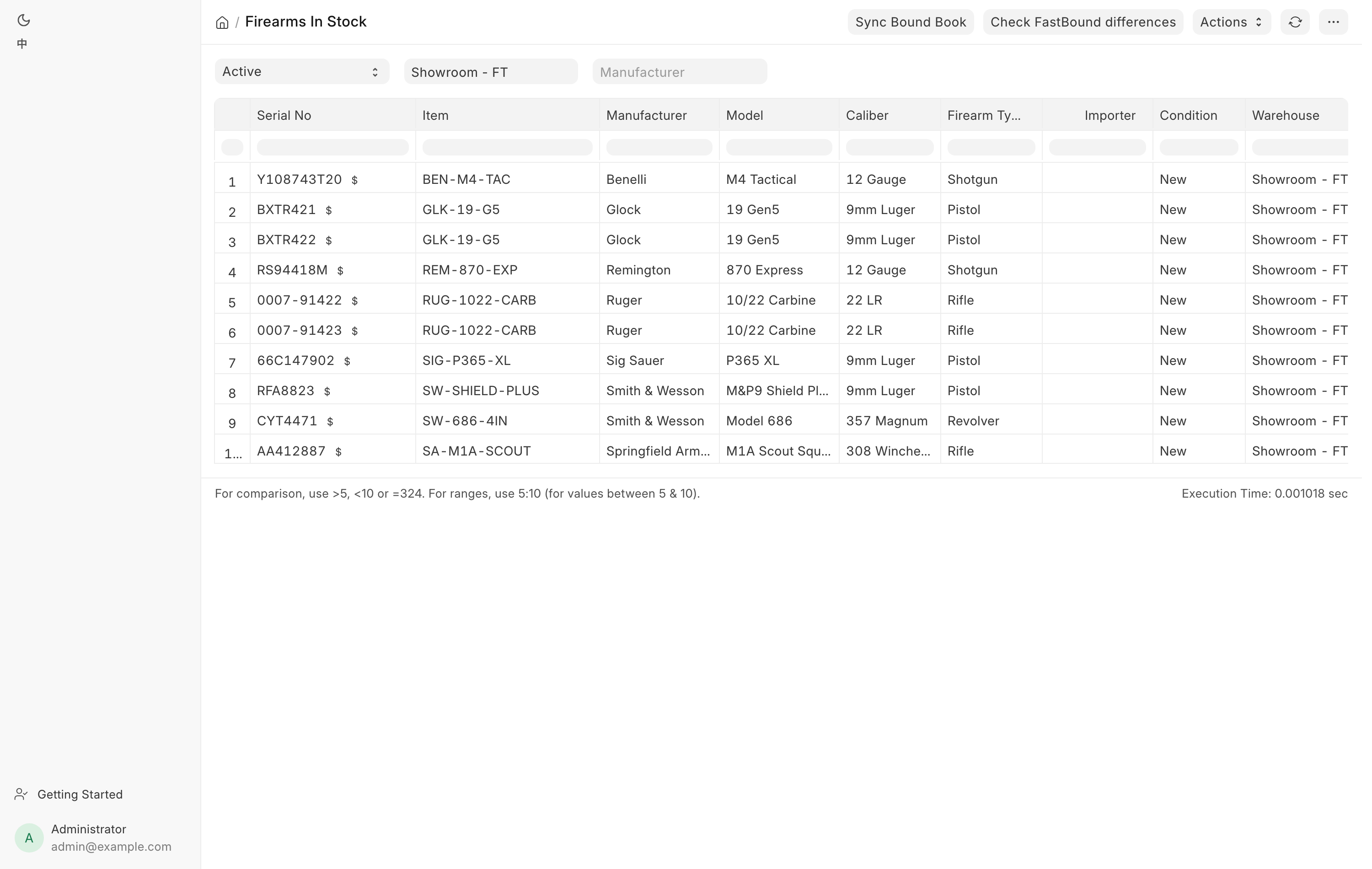
Open it from the sidebar under Compliance → Firearms in stock. It opens for Stock User, Stock Manager and System Manager.
The report lists every serialized firearm, filtered by Stock Status (default
Active), Warehouse and Manufacturer. Manufacturer, model, caliber and
firearm type show the gun's own value where it has one, falling back to the
model's. Importer never falls back, so a blank importer column means that gun
carries no import marking. Location is the gun's place in the store, blank
when it has none. See Storage locations.
The FastBound column links straight to the gun in the bound book, or shows a dash when the gun has no FastBound link at all. A dash on a regulated gun is itself a finding.
Two buttons do the comparison:
- Check FastBound differences compares each in-stock gun's identity fields against the bound book and reports which guns differ and in which fields. Fix each one from its Serial No with Sync with FastBound.
- Sync Bound Book finds guns that are in stock here but disposed in FastBound, and offers to issue them out. It previews first and only removes the guns you were shown. Consignment guns are never removed.
Both are covered in detail on FastBound.
Two mismatches to look for by eye while you are here:
- A gun on the rack that is not on the report. It was never received properly.
- A gun on the report that is not on the rack. It was sold or transferred without being booked out.
Where alerts go
The system does not rely on you opening these reports. It also pushes.
The notifications bell. In-app notices go to the people who act on them. They show in the app only; nothing is emailed.
| Notice | Who gets it |
|---|---|
| A NICS result on a sale (Proceed, Delayed, Denied, or a Delayed check that cleared) | Sales User, Sales Manager, System Manager |
| A new web or GunBroker order | Sales User, Sales Manager, Stock Manager, System Manager |
| A distributor shipped an order to the store | Sales User, Sales Manager, Stock Manager, System Manager |
| "A&D book: FastBound refused …" | Stock Manager, Sales Manager, System Manager |
See the Dashboard.
Email. Operational alerts go to the addresses listed in
FFL Settings under Alert Recipients, comma or
newline separated. Leave it empty and they go to every System Manager instead.
Every subject is prefixed [POS Alert].
The ones that matter here:
| Alert | When | How often |
|---|---|---|
[POS Alert] N FastBound record(s) stuck unsynced |
A bound-book record carries a sync error, other than one marked [NOT A&D] |
Once a day at most |
[POS Alert] N trade-in draft(s) not yet in the bound book |
A trade-in draft is older than today | Twice a day at most |
[POS Alert] Payroc: N card charge(s) no longer captured at the gateway |
The daily card check found a charge voided or reversed outside the POS | When found |
The trade-in reminder exists because of the next-business-day rule in 27 CFR 478.125(e). It runs whether or not FastBound is switched on, because the obligation is the store's. See Trade-ins.
Assigned to-dos. Some conditions raise an assigned task rather than an email, and those go to enabled users holding Stock Manager, Sales Manager or System Manager. A document that already has an open task does not raise a second one, so a recurring problem shows as one item, not fifty.
On the record itself. A serial mismatch between a 4473 and an invoice is posted as a comment on the order as well as raised as an alert, so whoever opens that order sees it.
Note
Set Alert Recipients to a real, monitored address. Left blank, these alerts go to every System Manager, which in practice is often nobody's inbox.