Form 4473 and NICS
How a firearm sale is held until the form and the background check are on record, and what happens when they are not. Cashiers run the counter half; managers own the overrides and the review.
The two routes
The store runs one of two ways, set by Paper 4473 Mode in FFL Settings.
Electronic, with the mode off and FastBound switched on. The cashier starts the form from the register, the buyer and the dealer complete it in FastBound, and FastBound tells the system when it is done.
Paper, with the mode on. The 4473 is filled in on paper and the background check is run by phone or the FBI portal. Nothing will ever arrive to close the order, so the cashier states at the counter that the form is done.
Switching the mode takes effect on the next POS page load. Reload any till that is already open, or it keeps behaving the old way.
Statuses
Two fields track a firearm order. They live on the order and on the resulting disposition.
4473 Status is N/A, Pending or Completed.
NICS Status is N/A, Proceed, Delayed, Denied or Cancelled.
A sale of a regulated firearm cannot be completed until Completed and
Proceed are both on record for every gun on the ticket. Antiques are exempt
and never start a 4473.
The button next to Complete Order shows the state:
| Button reads | Color | Meaning |
|---|---|---|
| FastBound 4473 | Grey | Nothing started yet. Click to begin. |
| Awaiting 4473 | Orange | Held. The form is in flight. |
| 4473 Complete | Green | Cleared. You can complete the order. |
| Record Paper 4473 | Grey | Paper mode. Click when the form is done. |
| 4473 Recorded | Green | Paper mode, recorded. |
| 4473 Not Configured | Red | Neither route is available. See below. |
A small refresh control sits beside it in electronic mode, tooltip "Refresh 4473 status". Use it when you believe FastBound has finished but the screen still says Awaiting.
The payment button changes too on a firearm ticket: Take Payment, then Paid — waiting for 4473 once money is on a held order, or Save — waiting for 4473 on a trade-in ticket that takes no money. Selling a firearm walks through each.
The electronic route
- Ring the gun up as usual and take the ticket to payment.
- Click FastBound 4473. Enter the serial for each firearm row.
- The order is held in Draft and a FastBound tab opens. Click Start New 4473 there and work through the form with the buyer.
- Serve other customers meanwhile. Reopen the order later from Recent Orders → Draft.
- When FastBound commits the disposition it notifies this system, which stamps the order Completed with the NICS outcome and unlocks the till.
- Complete the order.
A pickup ticket for a gun ordered to the store runs the same button. The ticket is $0, because the money was taken on the order, but the 4473 and NICS check are the same.
Payment can be taken before the check clears. The system says so plainly if you do: "Payment is recorded on this draft, but it contains a firearm and the 4473/NICS has not cleared." If the buyer is denied, a manager refunds and deletes the draft.
An order whose 4473 is already complete cannot be silently restarted. Clicking the button on such an order opens 4473 already complete: "This order already has a completed 4473. To redo it, void the FastBound disposition first." A Sales Manager or System Manager also sees Redo 4473 there.
Redo 4473
Use it when a completed 4473 genuinely has to be done again: the wrong serial was on the form, or the disposition was voided in FastBound.
- Void the disposition in FastBound first. The system does not touch FastBound.
- On the held order, click the 4473 button, then Redo 4473.
- Tick I have already voided this disposition in FastBound.
- Type a Reason (recorded on the order) and click Redo 4473.
The system cancels the order's Retail Sale dispositions, puts the order back to
4473 Pending with no NICS result, clears the FastBound link and the signed-PDF
link, and writes the reason on the order. A paper or override
4473 record for the order is marked NICS Cancelled, so the
old form can be told apart from the corrected one. The corrected form can then
be run again in FastBound, recorded with Record Paper 4473, or closed with a
manager override.
The paper route
With Paper 4473 Mode on, the button reads Record Paper 4473. Clicking it opens a dialog that asks you to confirm, for every firearm on the order:
- the ATF Form 4473 is completed and signed;
- the background check was run and came back Proceed;
- the form is filed with your records.
It ends with: "This is recorded in the bound book under your name and cannot be undone from the counter." Click Yes — 4473 completed.
Recording it books the bound-book disposition for every gun on the ticket, stamped with who ticked the box and when, and the sale can then be completed.
Federal recordkeeping
Paper mode changes only where the 4473 record lives. It relaxes nothing the ATF requires. The form must still be completed, the check still run, and the paperwork still filed exactly as before. Recording the attestation is all the software can do, which is why it stores who said so.
This is a counter action, not a manager action, on purpose. The same cashier who filled the form in says it is filled in, and putting a manager behind every gun sale would not make the record truer.
An order already sent to FastBound for an electronic 4473 cannot be closed out with a paper one. That order is waiting on a real form somebody is filling in, and the refusal is titled Electronic 4473 In Flight. It ends: "if it genuinely has to be redone, a manager can run Redo 4473." After a Redo 4473, the paper route is open again.
Manager override
The override is for when FastBound is the problem, not you: the form was genuinely completed there but never synced back, because a serial was edited in a shared account, a partner deleted the disposition, or FastBound was down.
It needs the Sales Manager or System Manager role and a written reason. It is done from the order in the desk view, not from the register.
- Open the held order from Sales → POS invoices in the sidebar.
- Click Manager Override 4473. It shows on any draft sale whose 4473 is
not
Completedand that carries a firearm, including one whose 4473 status isN/Abecause the form was run straight in FastBound without the POS button. - Read the dialog, Manager Override — Force-Complete 4473. It says what it does: "Use only when the 4473 + NICS were genuinely completed in FastBound but did not sync back here. This force-completes the sale and books an audited manual-override bound-book record (your name + reason). It does not update FastBound — reconcile the FastBound bound book separately."
- Type the Reason and click Force-complete the sale.
It books one Retail Sale disposition per gun, marked with the override flag, the
reason and your user, then flips the order's statuses so the sale can complete.
It is idempotent per gun, so a double click books one record. It also writes a
4473 record with Source Paper / override.
An override is not a lesser record
An override satisfies the sale gate exactly like a FastBound-committed disposition, and nothing downstream treats it differently. What makes it a control rather than a hole is a manager reading it back afterwards.
Every override, and every paper 4473 recorded at the counter, lands on the Hand-Asserted 4473 Dispositions report. Reading it back is item 3 of the morning routine, and Daily checks covers its columns and the questions to ask of each new row.
When neither route is available
If FastBound is switched off and Paper 4473 Mode is also off, the button turns red and reads 4473 Not Configured. Clicking it explains that the counter has no way to record a 4473 for the sale, and that a manager needs to switch on FFL Settings → Paper 4473 Mode or re-enable FastBound Settings → Enable FastBound. A manager can still use the override for a one-off.
Delayed checks and the Brady date
A Delayed NICS result means the sale is on hold, not refused. Federal law lets
a dealer transfer at their discretion once the third business day has passed
without a denial.
The Pending 4473 Orders report is the queue for this. It lists every draft order carrying a regulated firearm, oldest first. It is not in the sidebar. Open it from the Dashboard, under All records → Compliance → Pending 4473 orders. The Dashboard's Open 4473s block shows the same orders, split into tabs by state.
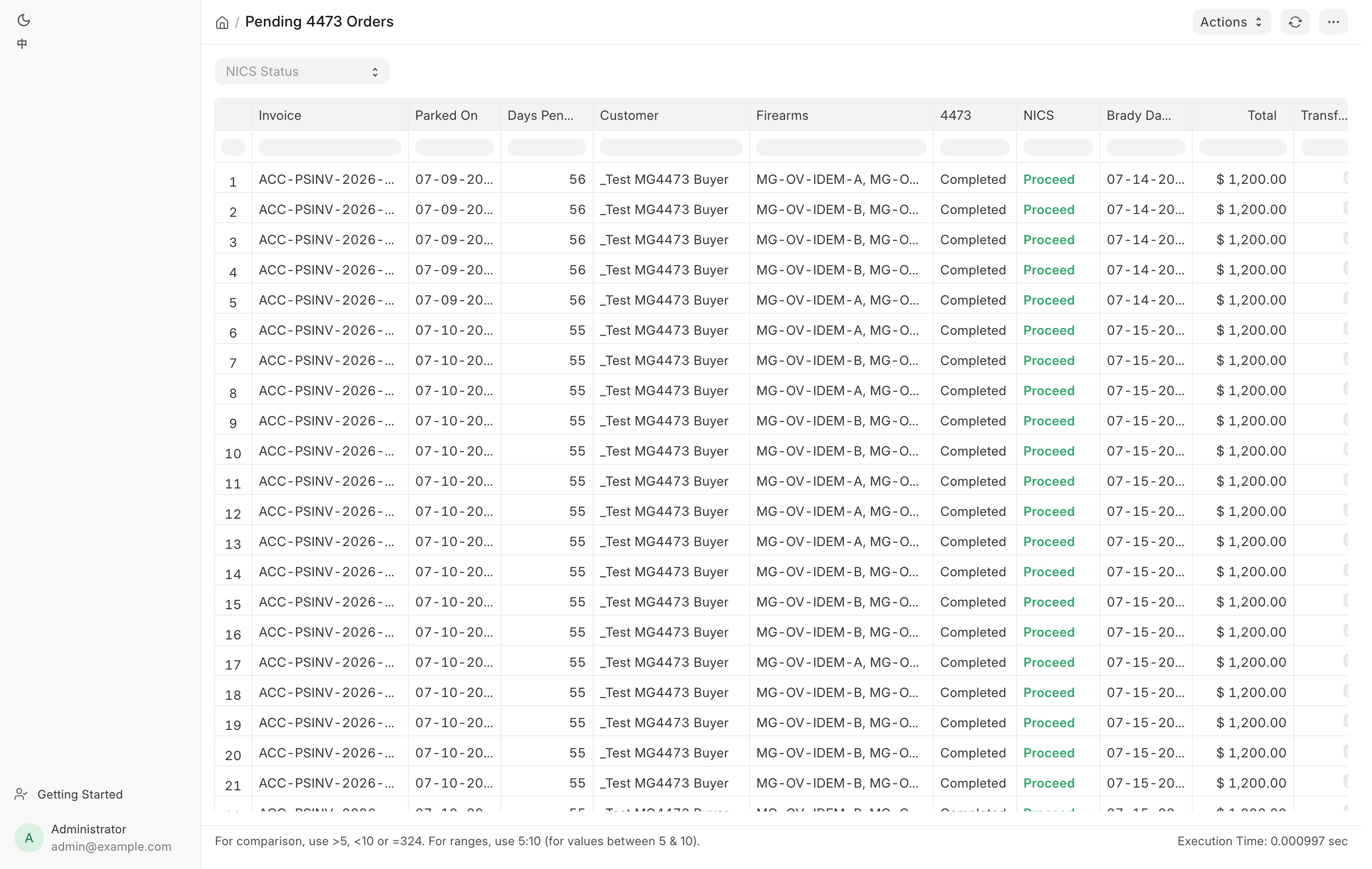
| Column | Meaning |
|---|---|
| Invoice | The held order. |
| Parked On | When the check started. |
| Days Pending | Calendar days since. |
| Customer | Who to call. |
| Firearms | The serials on the ticket. |
| 4473 | The form status. |
| NICS | The check status. |
| Brady Day 3 | The third business day after Parked On. |
| Total | The order value. |
| Transfer? | Ticked when this is a customer transfer-in, not a sale. |
| FB Pending Disp. | A pending disposition FastBound holds on the gun. Filled only with Check FastBound ticked. |
The NICS cell is colored: red for Denied, orange for Delayed, green for
Proceed. The Brady Day 3 cell turns orange once that date has arrived and the
check is still Delayed. Filter the report by NICS Status to work one outcome
at a time. N/A finds orders where no check has started.
Check FastBound is a filter that asks FastBound, gun by gun, whether an abandoned 4473 left a pending disposition holding it. It is off by default because it makes one call per firearm. A gun held that way reads Available in the bound book, but its next real disposition fails.
Clearing an abandoned order
A Sales Manager or System Manager sees Clear Abandoned Order… on the report. Use it for a draft nobody is coming back for, when FastBound still holds a pending disposition on its gun.
- Click Clear Abandoned Order…. The dialog is Clear an abandoned 4473 order.
- Pick the POS Invoice (drafts only) and type a Reason.
- Click Delete FastBound pending disposition & close order and confirm.
FastBound's pending disposition is deleted first, then the draft. If FastBound cannot be reached or refuses, nothing is changed. The draft is deleted, not cancelled, and stays restorable from the POS recycle bin. The reason goes to the Error Log, because the order itself is gone. Any 4473 record for the order stays.
The Brady date counts three business days forward from the parked date, stepping over Saturdays and Sundays. It does not know about federal or state holidays, so check the calendar before you rely on it.
The NICS Cleared Pickup email
When a check that came back Delayed later proceeds, FastBound tells the system and the buyer is emailed once, using the NICS Cleared Pickup template, to say their background check cleared and the firearm is ready. The email goes to the order's contact address, falling back to the customer record's email. It is sent once per order, so a later sync does not repeat it, and nothing is sent when there is no address on file.
Call the customer anyway if the gun matters. The email is a courtesy, not the queue.
NICS notifications
Every NICS result that lands on a sale also rings the
notifications bell of each
Sales User, Sales Manager and System Manager. The subject names the result, the
buyer and the order, for example "NICS Delayed —
Troubleshooting
| Message you see | What it means | Fix |
|---|---|---|
| Awaiting 4473 on an order you believe is done | The webhook has not arrived, or the page is stale. | Click the refresh control beside the button. |
FastBound has not sent the completed 4473 back yet. |
FastBound has no committed disposition for these guns. | Check the form is committed in FastBound, then refresh again. |
Could not reach FastBound — checked the local records only. Still waiting on the 4473. |
The connection failed. | Try again. If it persists, see FastBound. |
No serial on this order yet — click FastBound 4473 to start. |
Serials were never entered. | Start the 4473 and enter them. |
| 4473 already complete | The order is done and you clicked to start another. | Nothing to do, or use Redo 4473 if it genuinely has to be redone. |
| Electronic 4473 In Flight | Paper mode was used on an order sent to FastBound. | Use the refresh control once the form is committed, or ask a manager to run Redo 4473. |
| No 4473 route configured | Both FastBound and Paper 4473 Mode are off. | A manager switches one of them on. |
| A serial mismatch warning on an order | The serial on the invoice line does not match the one the 4473 was run on. | Verify against FastBound and correct the invoice serial before completing. |
A reason is required to redo a completed 4473. |
Redo 4473 was clicked with no reason. | Type the reason. |
Void the disposition in FastBound first, then redo the 4473. |
The voided box was not ticked. | Void it in FastBound, then tick the box. |
Only a DRAFT order can be cleared |
Clear Abandoned Order… was used on a completed order. | Nothing was changed. Pick the draft. |
Related pages
- Selling a firearm for the full counter flow.
- The bound book for the disposition this creates.
- FastBound for the integration itself.
- 4473 records for every completed form and its signed PDF.
- Daily checks for the morning routine.