The Dashboard
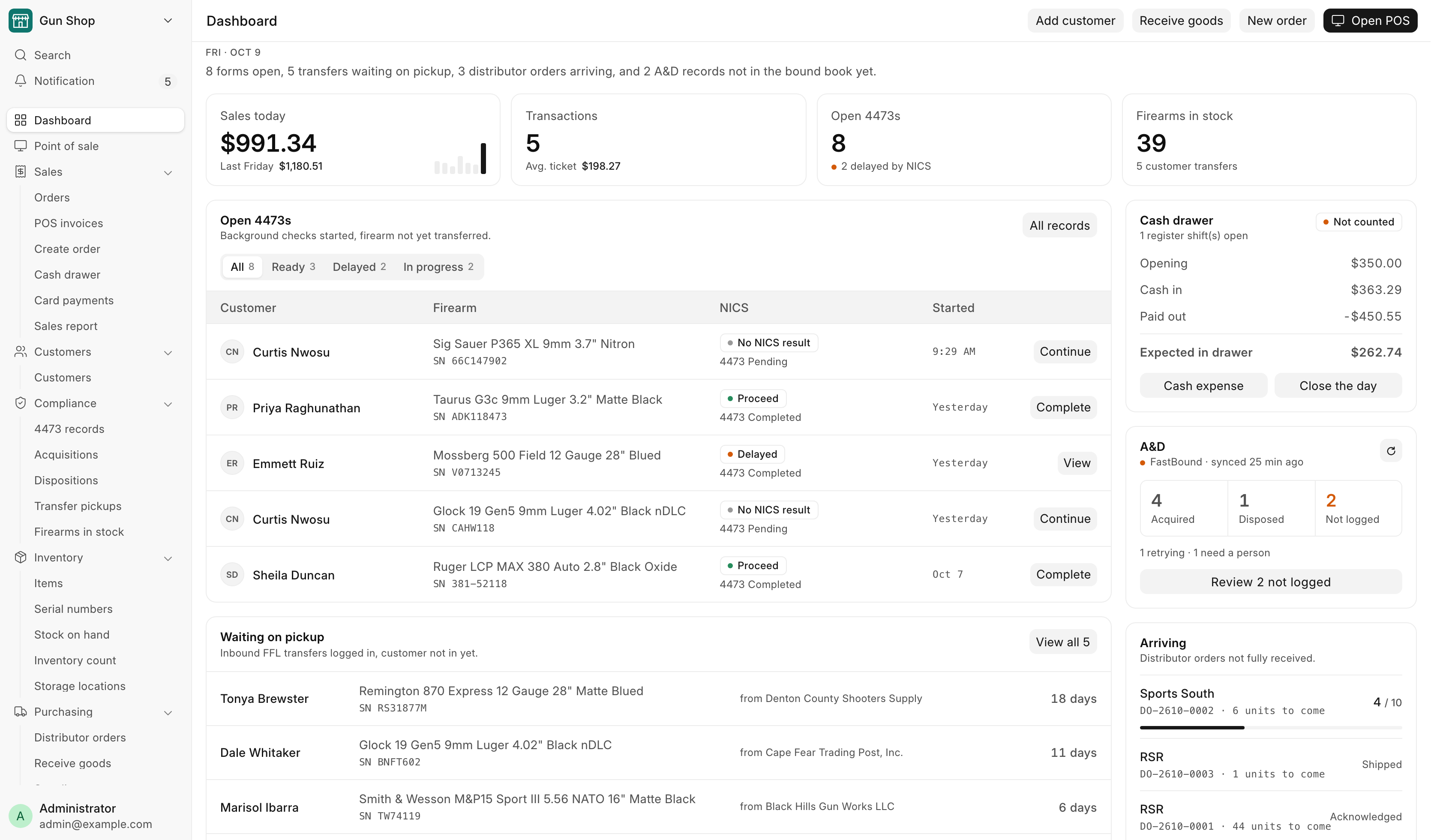
Everyone lands on the Dashboard after signing in. It shows what is waiting on someone today: open 4473s, transfer guns waiting for their owner, the cash drawer, the bound book and distributor orders on the way. The sidebar on the left and All records at the foot of the page reach everything else.
Getting here
The Dashboard opens by itself when you sign in. Its address is
/desk/gun-shop/store-overview. To come back to it from anywhere, click
Dashboard at the top of the sidebar. An old bookmark to the Gun Shop
workspace lands here too.
The page asks for fresh figures every minute while it is on screen, so you can leave it open on a back-office screen.
What you see depends on your login
Each block on the page checks your roles on its own. A block you are not allowed to see is left out, and the rest of the page moves up. A counter clerk sees no stock count, and a receiving helper sees no sales figures. If one block fails to load it says This could not be loaded. The rest of the page is up to date. and every other block still works.
The page opens for Sales User, Sales Manager, Stock User, Stock Manager, Accounts User and System Manager. See Who can do what.
The buttons at the top
| Button | Opens |
|---|---|
| Open POS | The Point of Sale register |
| New order | Create Order |
| Receive goods | Receive Goods |
| Add customer | A new customer record |
A button only shows when your login can open the page behind it.
Under the date, one sentence sums up what is waiting, for example "3 forms open, 5 transfers waiting on pickup, and 2 distributor orders arriving." When nothing is waiting it reads Nothing is waiting on anyone right now.
The figures across the top
| Tile | What it shows |
|---|---|
| Sales today | Today's net sales, returns included. Below it, the whole of the same weekday last week. The seven small bars are the last seven days, today last. Click the figure to open the Sales Report. |
| Transactions | How many sales today, not counting returns, and the Avg. ticket. |
| Open 4473s | Firearm orders parked for a 4473, and how many are delayed by NICS. |
| Firearms in stock | Every gun on the books. Below it, how many are on consignment and how many are customer transfers. Click the figure to open Firearms In Stock. |
The sales tiles use the Sales Report's own figures, so the two always agree.
Open 4473s
Background checks started, firearm not yet transferred. The tabs sort the parked orders by NICS result:
| Tab | Holds |
|---|---|
| All | Every parked firearm order, Denied included |
| Ready | NICS came back Proceed |
| Delayed | NICS came back Delayed |
| In progress | No NICS result yet |
Each tab lists its five newest orders: the customer, the gun and its serial, the NICS result, and when the order was started. The button on the right of a row says what to do next:
- Complete on a Proceed order. It opens the order so you can finish the sale.
- Continue on an order with no NICS result yet.
- View on anything else.
All records at the top of the card opens the 4473 records report. See Selling a firearm and 4473 records.
Waiting on pickup
Inbound FFL transfers logged in, customer not in yet. The four guns that have waited longest are listed, oldest first, with who shipped them and how many days they have sat. A gun past 21 days turns amber. View all opens the whole Pending Transfer Pickups report. See Customer transfers.
Cash drawer
What the drawer should hold right now, from the books:
| Line | Meaning |
|---|---|
| Opening | What the last count carried forward |
| Cash in | Cash sales, payments and cash from the bank since then |
| Paid out | Refunds, seller payments, deposits and expenses since then |
| Expected in drawer | What a count should find |
The pill on the right reads Counted once someone has closed today's drawer, and Not counted until then. Cash expense and Close the day both open the Cash Drawer page, where you do the work.
A&D
Today's bound-book activity, when FastBound is switched on. With FastBound off the card only says FastBound off.
- Acquired and Disposed count today's bound-book entries.
- Not logged counts records submitted here more than 15 minutes ago that FastBound does not have yet. The line under it splits them into those the system is retrying and those that need a person.
- The small refresh button recounts now instead of waiting for the minute.
Review N not logged opens the Not in the bound book yet list: each record, its state (Will retry or Needs a person) and the last error. "Will retry" records are pushed again by the daily retry. "Needs a person" means someone has to fix the cause and push again. See FastBound.
Federal recordkeeping
A record on this list is in this system but not yet in the bound book of record. Work the "Needs a person" ones the same day.
Arriving
Distributor orders not fully received, in the order Receive Goods lists them. Each row shows the distributor, the order number and how many units are still to come. Once part of an order has come in, the row shows a bar of units received. Receive goods at the foot of the card opens Receive Goods.
All records
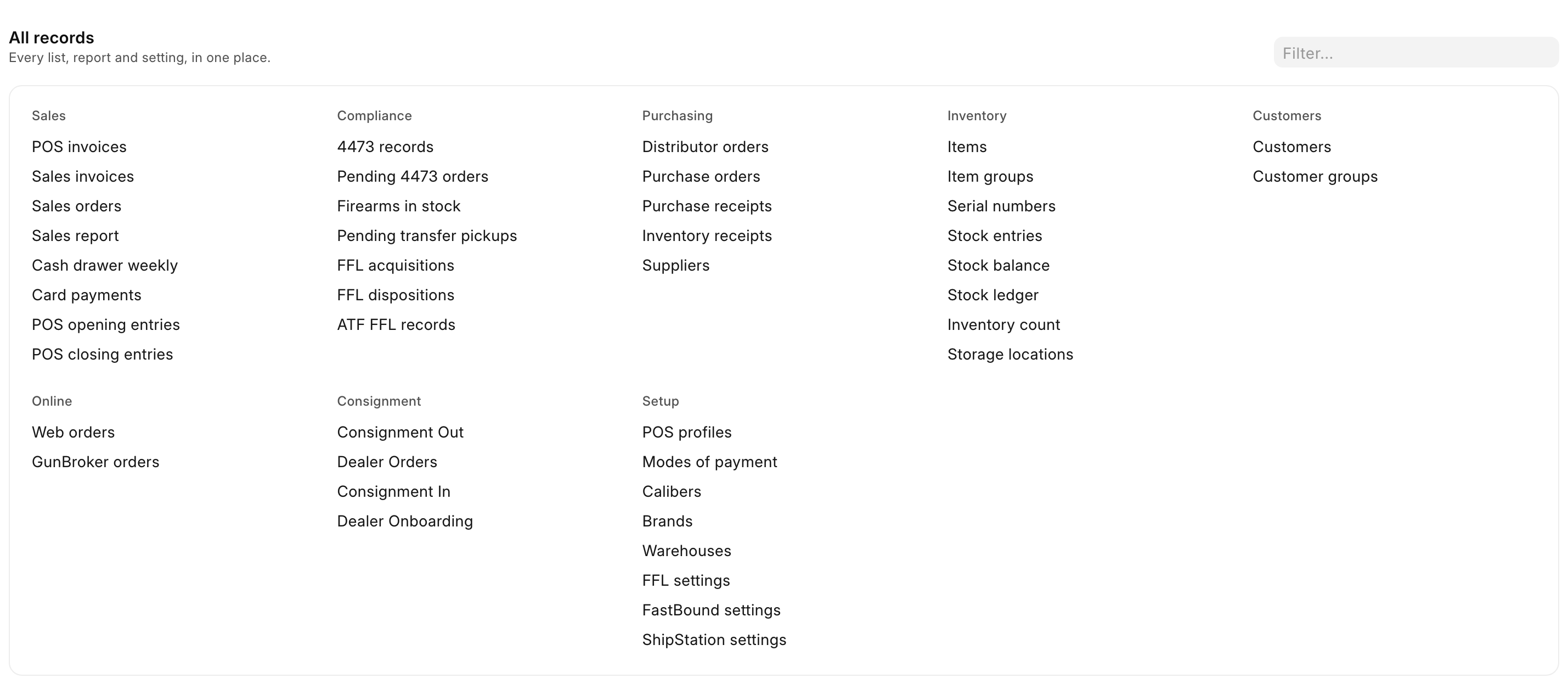
At the foot of the page, All records lists every list, report and setting your login can open, in groups: Sales, Compliance, Purchasing, Inventory, Customers, Online (while a web store or GunBroker is switched on), one group for each extension that adds one, and Setup last. Type part of a name in the Filter… box and the groups narrow as you type.
Reports and lists that have no place in the sidebar live here, for example Pending 4473 orders, Cash drawer weekly, Inventory receipts, POS opening entries and FFL settings.
The sidebar

The sidebar on the left is the way around. It is the same on every Gun Shop page.
| Row or group | What it holds |
|---|---|
| Dashboard | This page |
| Point of sale | The register |
| Sales | Orders (the Pending Order queue), POS invoices, Create order, Cash drawer, Card payments, Sales report |
| Customers | Customers |
| Compliance | 4473 records, Acquisitions, Dispositions, Transfer pickups, Firearms in stock |
| Inventory | Items, Serial numbers, Stock on hand, Inventory count, Storage locations |
| Purchasing | Distributor orders, Receive goods, Suppliers |
| Online | Web orders, GunBroker orders |
| Settings | The Settings workspace |
Click a group name to open or close it.
A row for an integration your store has switched off is hidden: Web orders without the web store, GunBroker orders without GunBroker, Card payments without the Payroc terminal. A group with nothing left in it is hidden too. An extension that is switched on adds its own group above Settings.
Orders is the Pending Order queue
The sidebar calls the Pending Order page Orders. The guide calls it the Pending Order queue. They are the same page.
At the top of the sidebar sit Search and Notification. Your name at the foot of the sidebar opens your own menu. See Getting started.
Notifications
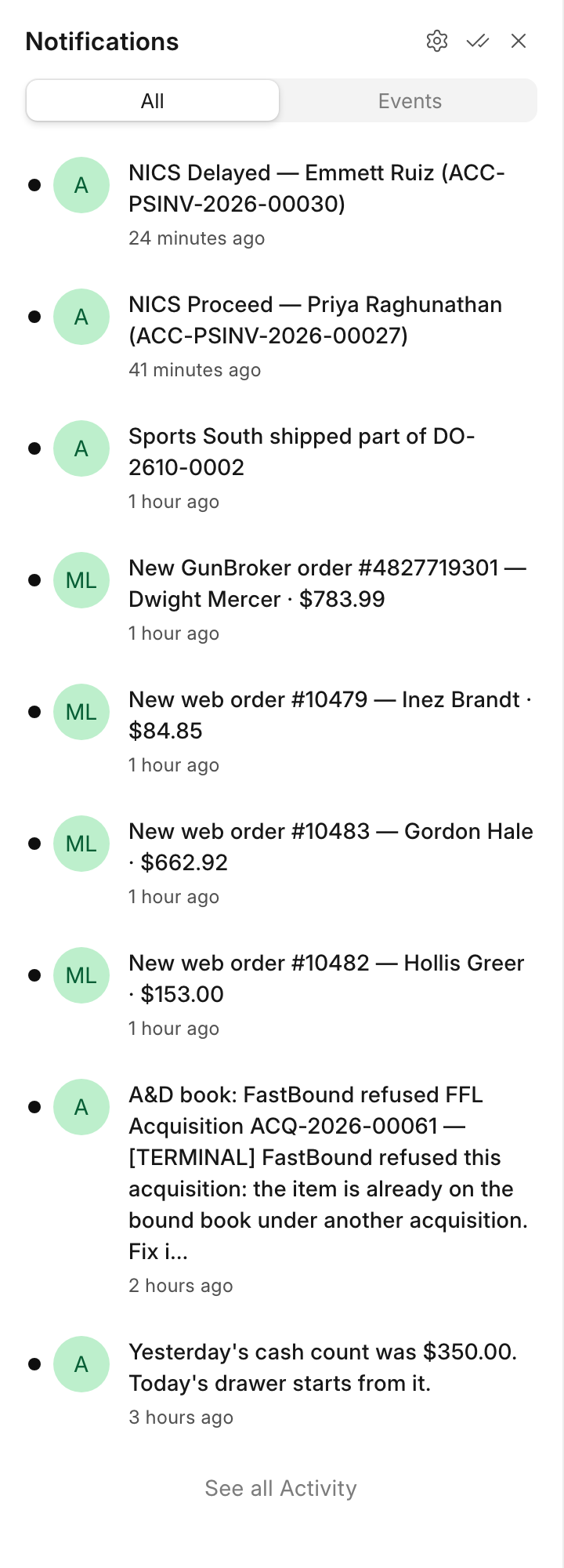
Notification, the bell near the top of the sidebar, shows a count when something new has arrived. Click it to open the list, and click an entry to open the record it is about. The system rings it for these events:
| Event | Example | Who gets it |
|---|---|---|
| A NICS result lands on a sale: Proceed, Delayed or Denied | NICS Delayed — Jane Doe (ACC-PSINV-2026-00412) | Sales User, Sales Manager, System Manager |
| A delayed check clears | Delayed NICS cleared: Proceed — Jane Doe (…) | Sales User, Sales Manager, System Manager |
| A paid web order or a GunBroker order comes in | New web order #2134 — Jane Doe · $612.40 | Sales User, Sales Manager, Stock Manager, System Manager |
| A distributor ships an order to the store, in full or in part | RSR shipped DO-2610-0003 | Sales User, Sales Manager, Stock Manager, System Manager |
| FastBound refuses a bound-book record for good | A&D book: FastBound refused FFL Acquisition … — reason | Sales Manager, Stock Manager, System Manager |
These notices stay in the app. None of them is emailed. Each one rings once per event, so a repeated message from FastBound or the web store does not ring twice. The shared Administrator login never receives them, so give every person their own login.
The same list also carries the system's own notices, such as a to-do assigned to you when a sale cannot be posted. A distributor gives no arrival date, so "shipped" is the last news the bell can give about an order. Watch Arriving for what is still to come.