4473 records and signed PDFs
Every completed Form 4473 gets a permanent record in the POS, with a private copy of the signed form when FastBound has one. Counter staff and managers use it to confirm a form was completed, to answer a question about an old sale, or to pull the signed PDF.
Before you start
- The report and the PDFs open for the Sales User, Sales Manager and System Manager roles, the same roles that run a 4473 at the register. An account with only Stock User or Stock Manager cannot open them.
- A signed PDF exists only for a 4473 done in FastBound. A paper 4473 or a manager override has a record but no PDF.
- The PDF holds the buyer's name, date of birth and address. Open it only when you need it. Every view is logged with your name.
Finding a 4473
- In the sidebar, click Compliance → 4473 records. You can also reach it from the Dashboard: All records on the Open 4473s block, or All records → Compliance → 4473 records.
- The report opens with every completed 4473, newest first.
- Narrow it with the filters: From Date, To Date, Customer, Serial (part of a serial is enough), NICS Status and Source.
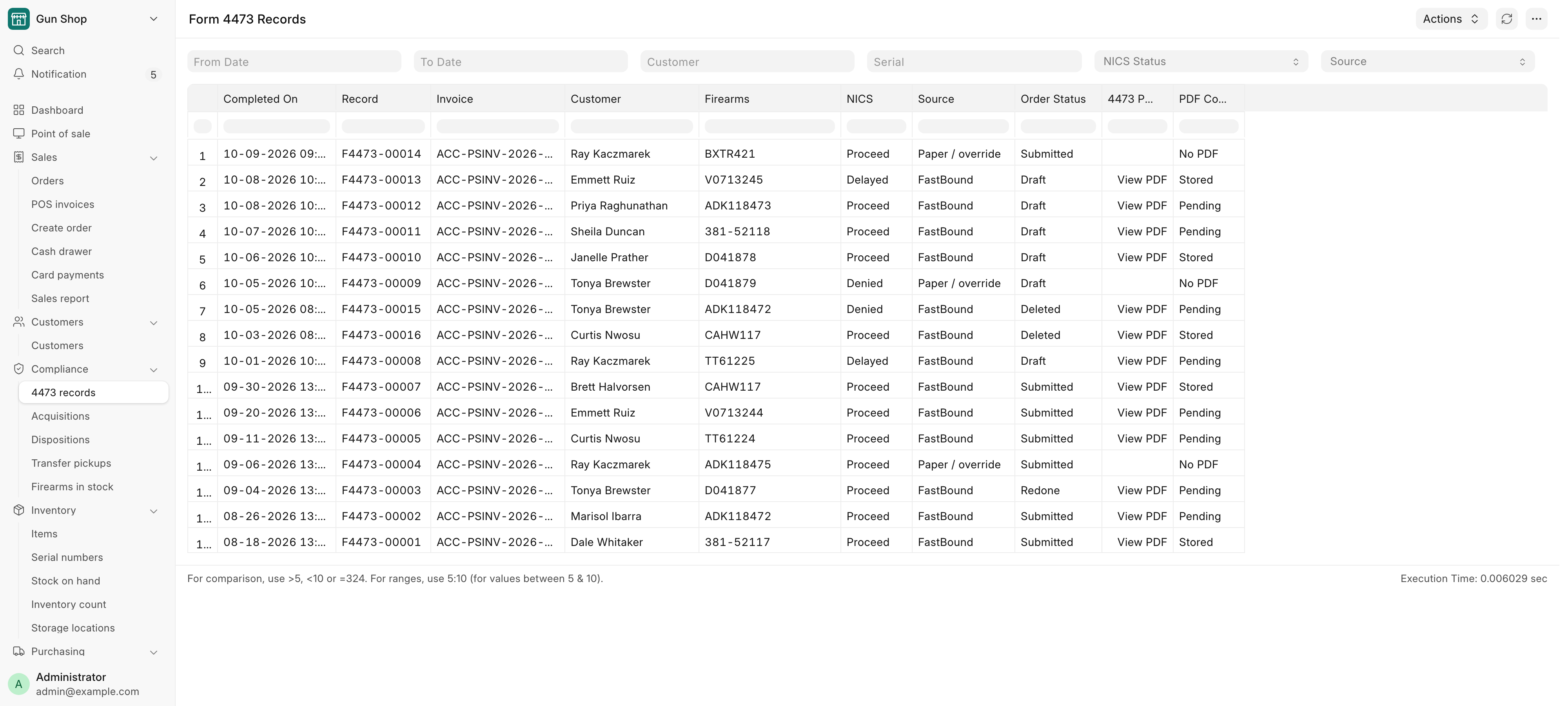
| Column | What it shows |
|---|---|
| Completed On | When the 4473 was completed. |
| Record | The 4473 record, named F4473-<number>. |
| Invoice | The order or orders it ran on. Click to open one. |
| Customer | The buyer. |
| Firearms | The serials on the form. |
| NICS | Proceed, Delayed, Denied or Cancelled. |
| Source | FastBound, or Paper / override. |
| Order Status | What became of the order. See below. |
| 4473 PDF | View PDF when a signed form can be shown. |
| PDF Copy | Whether the POS holds its own copy. See below. |
Order Status reads:
| Status | Meaning |
|---|---|
Submitted |
The sale completed. |
Draft |
The order is still held. |
Cancelled |
The order was cancelled after it completed. |
Deleted |
The order no longer exists, for example a denied buyer's draft or an abandoned order a manager cleared. |
Redone |
A manager ran Redo 4473 and a new form now covers the order. |
No POS order |
FastBound reported a completed 4473 that matched no order here. |
A record stays on the report whatever happens to its order, and whatever the NICS result was. That is the point of it: FastBound cannot list completed 4473s back to the POS, so the POS keeps its own.
Opening the signed PDF
- Find the row and click View PDF.
- The signed form opens in a new browser tab. Save or print it from there.
If your browser blocks the new tab, a message offers Open the signed 4473 instead. Click it.
The PDF comes from the POS's private copy when there is one. If the copy has not been made yet, the POS fetches the form from FastBound while you wait, and then stores a copy.
The same form opens from the order itself. On a sale whose 4473 was done in FastBound, the order in the desk view (Sales → POS invoices) carries a View Signed 4473 button.
PDF Copy reads:
| PDF Copy | Meaning |
|---|---|
Stored |
The POS holds its own copy. |
Pending |
Not copied yet. The POS keeps trying. |
Failed |
Copying failed five times. View PDF still asks FastBound. |
Not Found |
FastBound kept answering that it has no such form. |
No PDF |
A paper 4473 or a manager override. There is nothing to copy. |
What the system does
- When FastBound reports a completed 4473, the POS writes or updates its record and queues a private copy of the signed PDF straight away.
- Recording a paper 4473 at the counter, or a manager override, writes a record
with Source
Paper / overrideand no PDF. - Redo 4473 marks the order's paper or override records NICS
Cancelled, so the old form and the corrected one can be told apart. See Form 4473 and NICS. - Once an hour, the POS retries copies still
Pending, a batch at a time. - Every View PDF and View Signed 4473 is written to the Access Log with the user and the time.
- A 4473 record cannot be deleted by anyone.
Federal recordkeeping
The 4473 record and its PDF copy are a convenience, not the store's filed 4473. The signed form must still be kept exactly as ATF requires, whether on paper or in FastBound.
Troubleshooting
| Message you see | What it means | Fix |
|---|---|---|
| No 4473 PDF: "…has no signed 4473 PDF on file…" | A paper 4473, a manager override, or a FastBound 4473 whose link never reached the POS. | For a paper form, use the filed paper copy. Otherwise open the 4473 in FastBound. |
| FastBound unavailable: "FastBound is not enabled or not set up on this site…" | No copy is stored yet, and FastBound is switched off here. | A manager checks FastBound settings. |
| FastBound unavailable: "FastBound did not answer…" or "did not return the 4473 PDF" | FastBound did not respond in time. | Try again, or open the 4473 in FastBound. |
| 4473 not found | FastBound has no such form in the store's account. | Open the 4473 in FastBound to check. |
F4473-<number> is a 4473 record — it cannot be deleted. |
Someone tried to delete a 4473 record. | Nothing to fix. Records are kept for good. |
Related pages
- Form 4473 and NICS for how a 4473 is run and recorded.
- Daily checks for reading the overrides back.
- The bound book for the dispositions a 4473 creates.