Distributors hub
The hub at /app/distributor-hub is where a manager sets up and watches every wholesale house. Open it from Settings → Distributors. It shows one card per Distributor record. Anyone with a purchasing or stock role can read it. Changing a switch or the order needs System Manager or Purchase Manager.
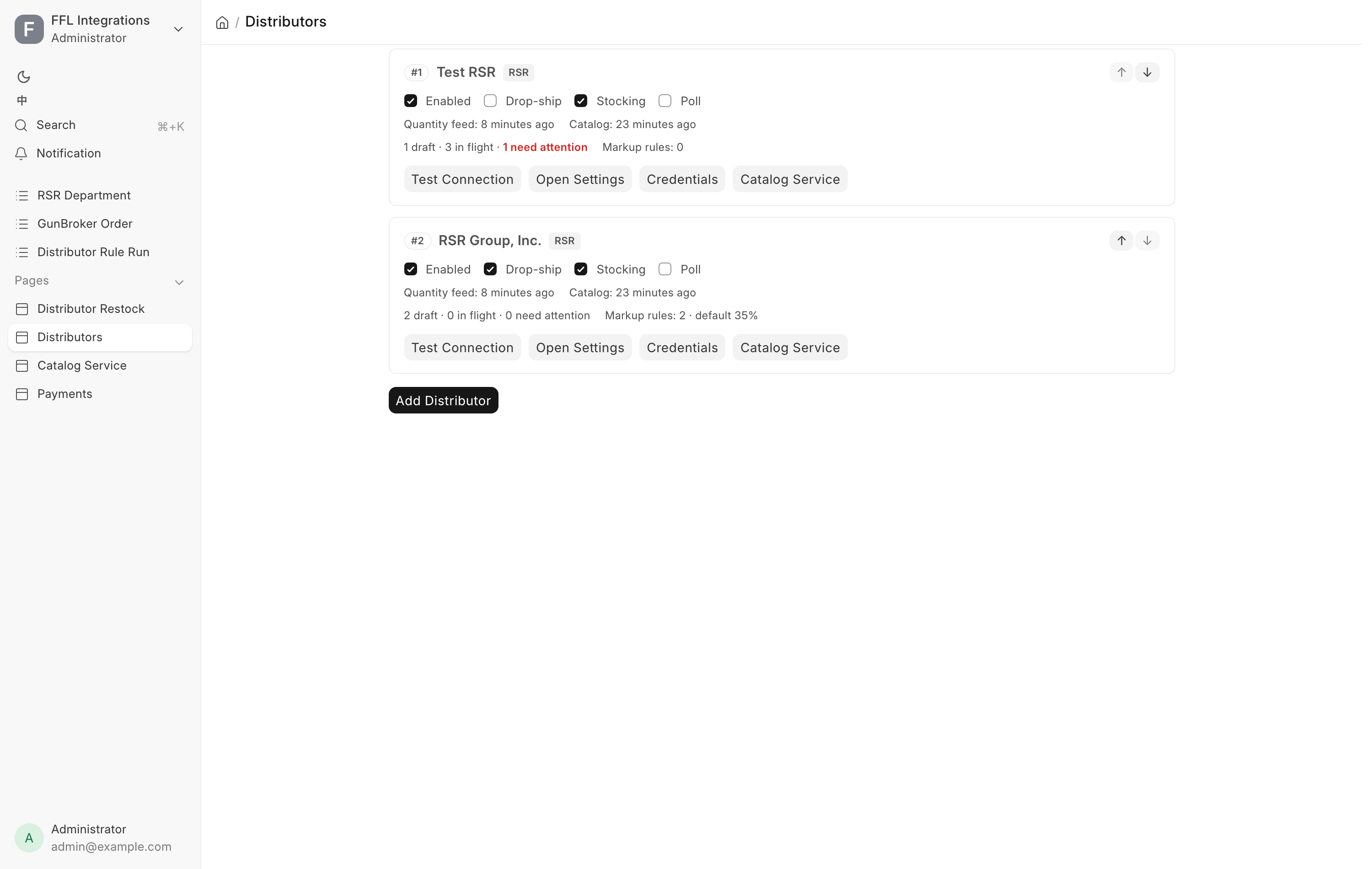
What a card shows
Across the top of a card sit the priority number, the house name and its provider code, plus the linked Supplier when the record names one. A house whose provider code has no integration behind it is marked not registered in red, and its Test Connection button is disabled.
The four switches
| Switch | What turning it on means |
|---|---|
| Enabled | The house is in use. Off, it is not searched, quoted or ordered from |
| Drop-ship | Orders may ship from this house straight to a buyer or their FFL |
| Stocking | You may raise stocking and procure-to-store orders |
| Poll | Every 30 minutes, the system pulls status, tracking and serials for this house's live orders |
A card with Enabled off is greyed. The switches save the moment you click them, and a failure puts the box back where it was.
The summary line
For RSR and Sports South, a read-only line under the switches sums up the house's own settings page.
| Item | Reads | What it means |
|---|---|---|
| Ordering | live | Enabled is ticked and Allow live orders is on |
| Ordering | off (disabled) | Enabled is unticked on this card |
| Ordering | off (Allow live orders is off) | The switch on the settings page is off |
| Ship to store | free over $500.00 | The freight rule for orders shipped to your store |
Ordering reads live only when both layers are on. Otherwise it names the layer that is off, or both. While Allow live orders is off, nothing is sent to the house. The Ship to store wording follows the house's own rules: RSR reads free or free over an amount, and Sports South gives one threshold for handguns and one for everything else.
Click Ordering to open the settings page on its Account tab, or Ship to store to open it on the Freight tab. See Integration settings.
The health line
| Item | What it tells you |
|---|---|
| Quantity feed | How long ago the live quantity heartbeat last arrived |
| Catalog | How long ago the catalog content heartbeat last arrived |
| Last order poll | When this house's orders were last polled. Shown only while Poll is on |
Any of these can read "never". When the provider itself cannot be reached, the health line is replaced by the error in red, and the rest of the card still draws.
The order line
Below the health line, a clickable summary reads as N draft, N in flight and N need attention. Clicking it opens the Distributor Order list filtered to this house. In flight covers Queued, Placed, Acknowledged and Partially Shipped. Need attention covers Hold and Error, and it turns red when it is not zero. Complete and Cancelled orders are history and are not counted.
With the OSA Dropship extension on, the same line also shows Markup rules: how many website markup rules name this house, and the default markup in force for it. The rules themselves are kept in the Drop-ship Center.
The buttons
| Button | What it does |
|---|---|
| Test Connection | Runs the provider's live probe and shows each check with a green, red or grey dot and a detail line. It is read-only and places no order |
| Pricing & stock | Opens the Distributor record. See below |
| Account & shipping | Opens the provider's own settings page: account, ordering and freight. Shown only when the provider has one |
| Catalog Service | Opens the catalog service health page for this house. Shown only when the house is fed by the catalog service and OSA Dropship is on |
| Drop-ship Center | Opens the Drop-ship Center on the products sold from this house. Shown only when the house has Enabled and Drop-ship on and OSA Dropship is on |
| Add Distributor | At the bottom of the page. Asks which provider to use, then opens a new Distributor form |
Priority is changed with the small ↑ and ↓ buttons in a card's header. They appear once there is more than one house.
Priority and what it drives
Priority orders the cards, lowest number first, and that order is the order the system prefers. It sets the column order in the fulfillment planner and picks the default house when nothing else names one. Houses on the same number sort oldest first, so a never-ordered house at 0 sits at the top. Moving a card rewrites every house's priority as 1 through N, so the list is always a clean sequence.
The Distributor record
Pricing & stock takes you to the house's own record. It has these tabs.
| Tab | What it holds |
|---|---|
| General | Code, Name, Provider, Supplier, the four switches (the last one is labelled Poll orders here) and Priority |
| Pricing | The website markup defaults for this house, when it keeps its own |
| Stock publishing | How much of this house's stock the website shows, when it keeps its own, plus the delivery time |
| Catalog service | Endpoint, Client ID and Secret, for a house read from its own catalog service. Blank uses the site-wide service on Data Service Settings |
| Status | Last order poll |
Supplier is the vendor on receipts and cost invoices for this house. A house with no Supplier set cannot be received from a distributor order.
Website pricing and stock settings
These only matter for products the website sells drop-ship through the OSA Dropship extension. By default every house uses one shared set of values, edited in the Drop-ship Center on the Pricing and Stock tabs. Tick Use its own markup and stock settings to give this house its own values. Only then do these fields show.
| Field | Tab | What it does |
|---|---|---|
| Default markup % | Pricing | Used only when no markup rule matches and the product has no MAP or MSRP |
| Rounding | Pricing | .99, none or whole, for that default-markup price. A matched rule uses its own |
| Safety buffer | Stock publishing | Units held back from the published quantity. Defaults to 3 |
| Display cap | Stock publishing | Most units published, whatever the feed says. Defaults to 5 |
| Zero stock when the feed is stale | Stock publishing | Publish 0 while this house's quantity feed is older than the watchdog threshold. On by default |
Two fields on the Stock publishing tab always show:
| Field | What it does |
|---|---|
| Lead time (business days, from) | Shortest usual delivery for this house's drop-ships. Published to the website as the product's lead time |
| Lead time (business days, to) | Longest usual delivery. It cannot be below the "from" value |
Leave both lead-time fields blank to publish none.
The markup-rule table that used to sit on this record is retired. Markup rules now live in one list for every house, in the Drop-ship Center → Pricing.
Dropship Brand Policy
Some brands will not be drop-shipped to a consumer. A Dropship Brand Policy record says how one brand is fulfilled.
| Field | What it means |
|---|---|
| Brand | The brand this policy covers |
| Distributor | Blank applies to every distributor. Set, it applies only to this house's catalog and beats a blank policy for the same brand |
| Policy | To Store or Direct OK. See below |
| Reason shown to staff | Shown on the counter and web-order fulfillment panels when the policy sends a line to the store |
| Policy | Meaning |
|---|---|
| Direct OK | The distributor accepts direct orders for this brand, despite its feed flags |
| To Store | Never drop-ship this brand to the buyer. Procure it into the shop first |
To Store is the default for a new policy record. A brand can carry one policy for every house and one more per house. The point is that a restricted brand stays sellable. It is bought in and passed to the customer rather than being taken off the store.
The Catalog Service page
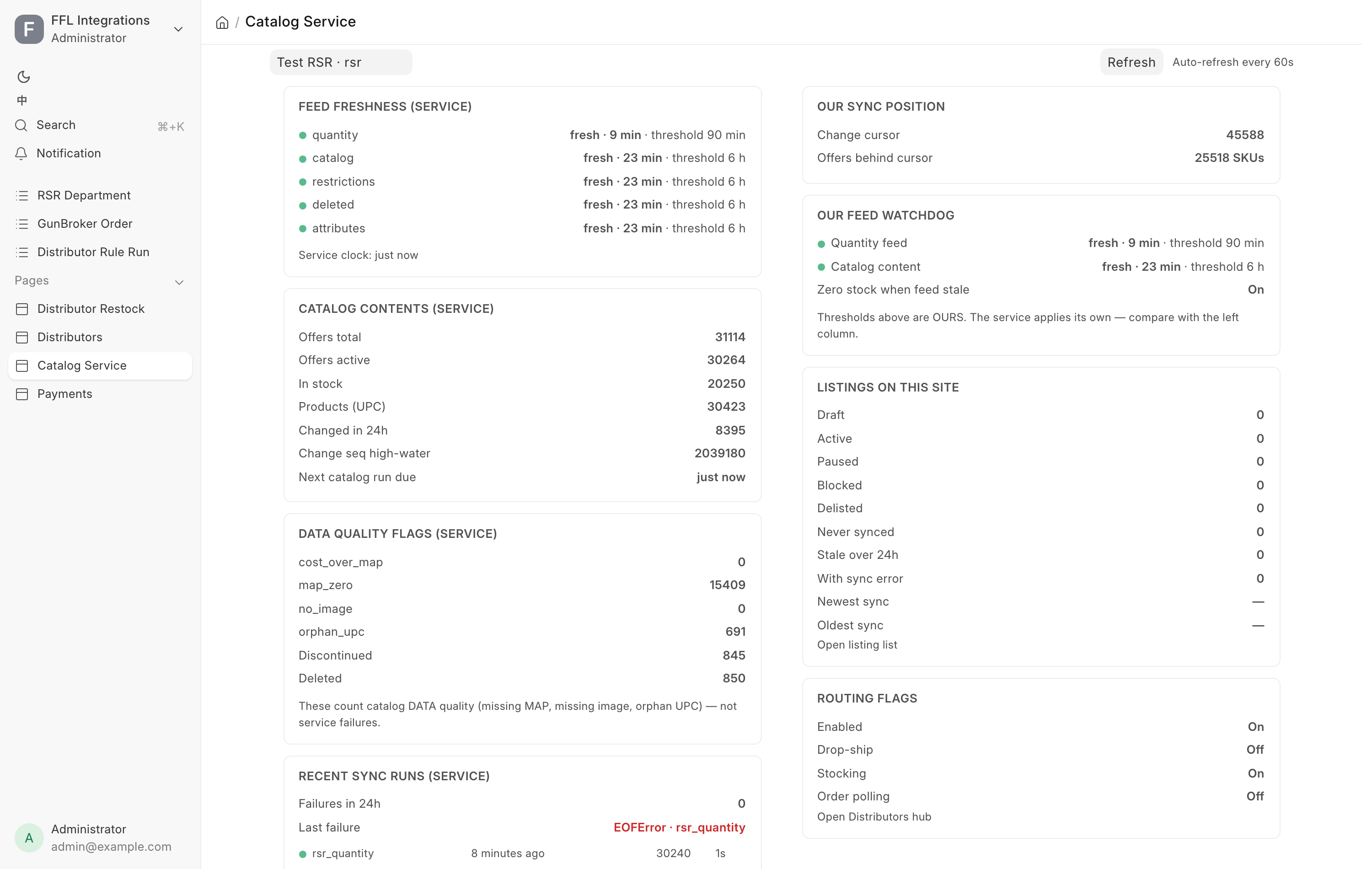
/app/catalog-service shows the shared catalog service's own health on the left, beside what this site actually consumed on the right. The page is part of the OSA Dropship extension. With the extension off it reads "OSA Dropship is turned off. A manager can turn it on under Settings → Extensions."
The two columns are never merged, because the whole point is to see where they disagree. Each column states its own staleness thresholds. The page refreshes itself every 60 seconds, and Refresh forces a read.
Left column, the service
| Card | What it holds |
|---|---|
| Feed freshness (service) | Each feed with a green or red dot, whether it is fresh, stale or never synced, its age, and the threshold applied |
| Catalog contents (service) | Offers total and active, how many are in stock, product count by UPC, how many changed in 24 hours, the change sequence high-water mark, and when the next catalog run is due |
| Data quality flags (service) | Counts of catalog data problems such as a missing MAP, a missing image or an orphan UPC, plus discontinued and deleted counts. These count data quality, not service failures |
| Recent sync runs (service) | Failures in the last 24 hours, the last failure with its error class and source, and a short run history with finished time, row count and duration |
The panel also warns when ingest is switched off service-side for this house, or when the service does not recognize the house's code. If your API client does not carry the catalog operations permission, the panel says Catalog Service is not enabled for this site and the right column carries on regardless.
Right column, this site
| Card | What it holds |
|---|---|
| Our sync position | The change cursor, and how many SKUs sit behind it |
| Our feed watchdog | Quantity feed and catalog content, each fresh or stale with its own age and threshold, plus whether Zero stock when feed stale is on |
| Listings on this site | Counts by status, how many have never synced, how many are more than 24 hours stale, how many carry a sync error, and the newest and oldest sync times. Open listing list opens the OSA Dropship Listing list for this house |
| Routing flags | The house's switches, read-only, with Open Distributors hub |
What a stale feed means on the sales floor
A stale quantity feed means the numbers on your web store are older than the watchdog is willing to trust.
Selling what you cannot verify
While Zero stock when the feed is stale is on, a stale feed publishes 0 for every listing of that house. Drop-ship items go out of stock on the web store until the feed recovers. That is the interlock working. Turning it off means the store keeps offering quantities nobody can confirm, and the failure mode is overselling a gun you do not have.
The staleness watchdog runs every fifteen minutes. It alerts once per house, and where that house has the interlock on, it pushes the listings to zero.
The two columns can disagree, and that is worth reading. A fresh service feed beside a stale local watchdog points at your own sync. A stale service feed points upstream, and there is nothing to fix on this site.