The MCP server
An AI assistant can work the POS directly through a Model Context Protocol server rather than by driving the screens. This page is how it is switched on and connected, what it can do, and the things about it that matter more than the setup.
It talks to the live store
A connector points at the store's own POS, which is production. A write is a real business action: a gun you list is one a customer can buy a minute later, and a disposal writes the federal acquisition-and-disposition record. Development and testing go to a local site, never here.
Two ways to connect
| Way | Who it suits | Sign-in |
|---|---|---|
| Remote connector | Everyone. The normal way | Your own POS account, in the browser. No keys |
| Local server | A developer on their own machine | An API key and secret in a file |
Both run the same server and offer the same tools, and both have the same two surfaces: a read-only one for accounting and a full one. The rest of this page covers the remote connector first.
The store assistant that floats on every desk page is a different thing, with its own agent and its own read-only endpoint. See The store assistant.
Switching the connectors on
Each store's POS serves its own pair of connectors. A System Manager switches them on in Settings → MCP Settings. Both start off.
| Field | What it does |
|---|---|
| Enable Read-only MCP Server | Lets signed-in users read POS data from an AI assistant (reports, stock, orders) with their own permissions. Nothing can be changed through it |
| Read-only MCP Server URL | The address to give an assistant. Shown once the box is ticked |
| Claude Code Command (Read-only) | A ready-to-copy command for Claude Code |
| Enable Full MCP Server | Lets signed-in users also change data (payments, orders, listings), limited to what their own POS role allows |
| Full MCP Server URL | The address for the full connector |
| Claude Code Command (Full) | The command for the full connector |
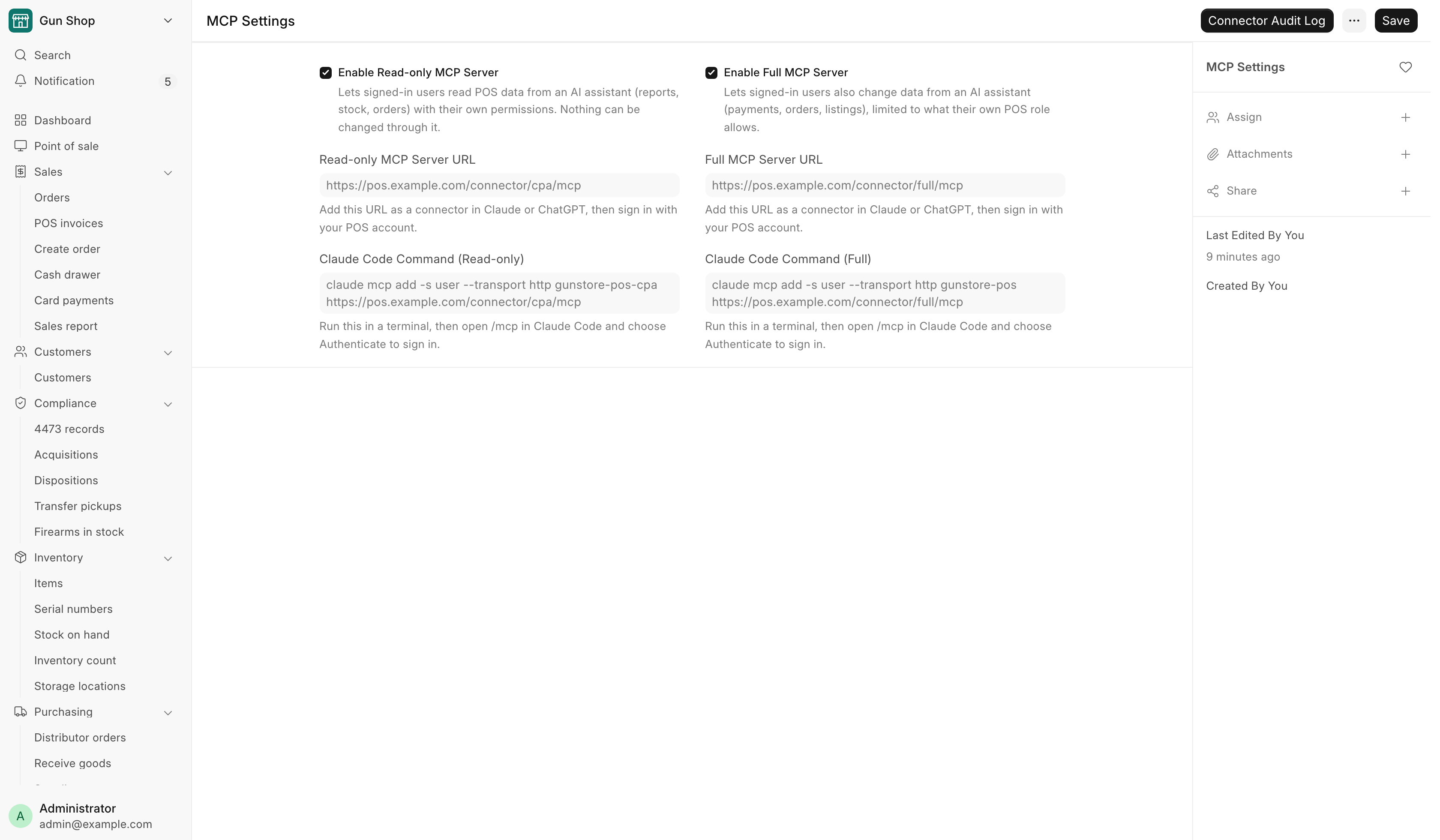
The addresses look like https://<your POS>/connector/cpa/mcp for the
read-only connector and https://<your POS>/connector/full/mcp for the full one.
The switches also turn the POS's own sign-in for connectors on and off. A
person always approves the connection on the POS. That step is never skipped.
A switched-off connector still accepts a sign-in, and then refuses every call with "The cpa MCP server is switched off in MCP Settings." or the same for "full".
Connecting an assistant
Claude Code. Copy the command from MCP Settings and run it in a terminal. It reads like this:
claude mcp add -s user --transport http gunstore-pos-cpa https://<your POS>/connector/cpa/mcp
claude mcp add -s user --transport http gunstore-pos https://<your POS>/connector/full/mcp
Then open /mcp in Claude Code, choose Authenticate, sign in to the POS in
the browser and approve. Configuration changes take effect on the next session.
Claude on the web, or ChatGPT. Add the URL as a connector in the assistant's settings, then sign in with your POS account and approve.
A store with two POS sites, such as two shops, has a pair of addresses per site. Name each connector so you can tell them apart.
Whose permissions it uses
Every call runs as the person who signed in, with that person's own POS roles. A counter account connected to the full connector can do what that counter account can do on screen, and no more. There is no separate permission system to keep in step.
The POS accepts only tokens issued to a connector that registered itself through this sign-in. A user with Restrict IP set on their account cannot use a connector, because the calls reach the POS from the connector, not from the user's own address.
To cut off one person's access, a System Manager revokes their token in Desk under OAuth Bearer Token.
The Connector Audit Log
Every connector call is recorded in Connector Audit Log, reads included. The row is written before the tool runs. If it cannot be written, the tool does not run. Open it from the Connector Audit Log button on MCP Settings.
| Field | What it holds |
|---|---|
| User, Full Name | Who made the call |
| Tool | Which tool |
| Surface | cpa or full |
| Connector, OAuth Client | Which assistant made it |
| Status | Started, then Success or Failed |
| Started At, Finished At | When |
| Arguments, Error | What was asked, with secrets masked, and any error |
Only a System Manager can read it. Rows can never be deleted.
The two surfaces
| Surface | Tools | What it is for |
|---|---|---|
Read-only (gunstore-pos-cpa) |
27, none of which write | Month-end, a tax question, a stock count, anything an outside bookkeeper would do |
Full (gunstore-pos) |
108 on the remote connector, 111 when GunBroker actions are on | Day-to-day work, within the user's own role |
The read-only surface is not a suggestion enforced by prompting. Three layers each fail closed on their own:
- The write tools are not registered, so they are absent from the tool list.
- The server refuses every writing call, and allows only methods named one by one as read-only.
- Ten settings pages refuse to be read at all: FFL, FastBound, RSR, Payroc, WooCommerce, Dealer WooCommerce, ShipStation, GunBroker, Sports South and Data Service Settings. A configuration page has no accounting purpose.
On the full connector, the three GunBroker write tools are present only at a store that has GunBroker switched on. The four distributor queue actions are never offered on a connector. Confirming a distributor order stays a person's job on screen.
What stops a mistake
Consequential tools refuse the first call. They come back asking to be
called again with confirm=true. The point is the sentence in between: the
assistant states what it is about to do, and a person gets to say no before
anything happens. Treat a tool that asks for confirmation as one that needs a
human in the loop, not as a flag to set reflexively.
Credentials never cross the boundary. Password and API-key fields are stripped on the way in and cannot be read back out. Rotating a key is done in the Desk, not through an assistant.
Some settings are never written by a tool. The fields that decide which GunBroker is contacted, hold its credentials or move money are refused on every write path. A person changes them in Desk.
What the tools cover
Roughly, by what they are for. The server ships its own reference; this is the shape.
- Finding things. Items by name, barcode or SKU; firearms in stock; serials and their prices; customers and dealers; documents of any type.
- The queues. Pending counter orders, pending web orders, the consignment queue, distributor orders.
- Reports. The reports under Reports, plus an accountant's pack: Sales Report, Inventory Receipts, general ledger rows, financial statements, sales-tax liability, aged receivables, and the card payments ledger (every Payroc payment and refund for a date range, matched to the POS). The ledger needs System Manager, Accounts Manager or Accounts User.
- Cash drawer. Today's drawer, closing the day, deposits, cash from the bank, expenses, undo, the cash log and the weekly report. See The cash drawer.
- Inventory. Receiving, stock levels and adjustments, inventory counts, the store map and moving things between locations, promoting a catalog hit to a real item.
- Compliance. Starting a Form 4473 or a transfer 4473, the manager override for a stuck 4473, pushing a serial to FastBound, reconciling the bound book, verifying an FFL against the ATF directory.
- Fulfillment. Disposing an order, recording a payment, pushing a shipment, marking shipped, cancelling an order.
- Consignment. Building, shipping and repricing consignments, retrying a settlement invoice, taking guns back.
- Channels. Listing and delisting on the web store and on GunBroker.
- Distributors. Catalog search across houses, quotes, live availability, the routing queue, fulfillment options for a web order.
- Settings. Reading and updating the integration settings pages, except the credential fields.
Anything without its own tool can be reached on the full surface through the generic tools, which read any record and call any whitelisted method by name. Acting on the system names the ones a manager needs.
The local server
For a developer who needs it on their own machine. It speaks MCP over stdio and signs in with one API key, so it can do whatever that key's user can do.
You need uv. Then, from a clone of the server:
cd gunstore-pos-mcp
uv sync
cp .env.example .env    # then fill it in
The server reads FRAPPE_BASE_URL, FRAPPE_API_KEY and FRAPPE_API_SECRET.
Generate the pair in the Desk under the avatar menu, My Settings, API Access,
Generate Keys. They inherit that user's roles, so make the keys for a user whose
access matches the job. Do not commit them and do not paste them into a
conversation.
Register it with Claude Code. Let the CLI write the configuration; editing the JSON by hand is how it ends up in the wrong file.
claude mcp add gunstore-pos-local -s user -- uv run --directory /path/to/gunstore-pos-mcp gunstore-mcp
claude mcp add gunstore-pos-cpa-local -s user -e GUNSTORE_MCP_MODE=cpa -- uv run --directory /path/to/gunstore-pos-mcp gunstore-mcp
Codex reads ~/.codex/config.toml:
[mcp_servers.gunstore-pos-local]
command = "uv"
args = ["run", "--directory", "/path/to/gunstore-pos-mcp", "gunstore-mcp"]
startup_timeout_sec = 120
Restart Codex after editing it. A mode value the server does not know stops it from starting, rather than running a writable server by mistake.
A key is the whole account
The read-only layers guard the MCP calls only. Anyone who copies the key can use it directly. For an outside bookkeeper, use the read-only remote connector with their own POS account. If a key must be handed out, make it for a dedicated user holding read-only roles.
Checking it works
Ask the assistant for something harmless and specific, such as the firearms in stock, and confirm the answer matches what Firearms In Stock shows on screen. If the two disagree, stop and find out why before trusting anything else it says. On the remote connector, the call also appears in the Connector Audit Log under your name.
Things that will bite
A stale tool list. Change the server and the client keeps the old tool definitions until it reconnects. An assistant insisting a tool does not exist, or calling it with the wrong arguments, is usually this. Reconnect the server.
A switched-off connector. Sign-in works and every call is refused with "The … MCP server is switched off in MCP Settings." Ask a System Manager to tick the box.
Pointing at the wrong store. There is nothing in a tool result that shouts which site answered. Know which address each connector carries before you write anything.
The other servers
The store assistant (OSA AI extension) is the chat built into the POS. It runs its own agent, reads the store through its own read-only endpoint as one chosen user, and asks staff to approve every action. See The store assistant.
FastBound has a separate server for the electronic bound book. It connects to a real acquisition-and-disposition record, so its write tools are off by default and should stay that way unless someone has decided otherwise on purpose. It needs Node 20.12 or newer; the version in most distributions' package managers is too old and fails at startup.