Connecting a consignment dealer
A manager sets up a new partner FFL once, before the first shipment. The wizard looks the dealer's license up with the ATF, creates their customer record, opens the API login their POS reports with, and records where your shipments are pushed. Nobody signs in with that login, and no email is sent.
Before you start
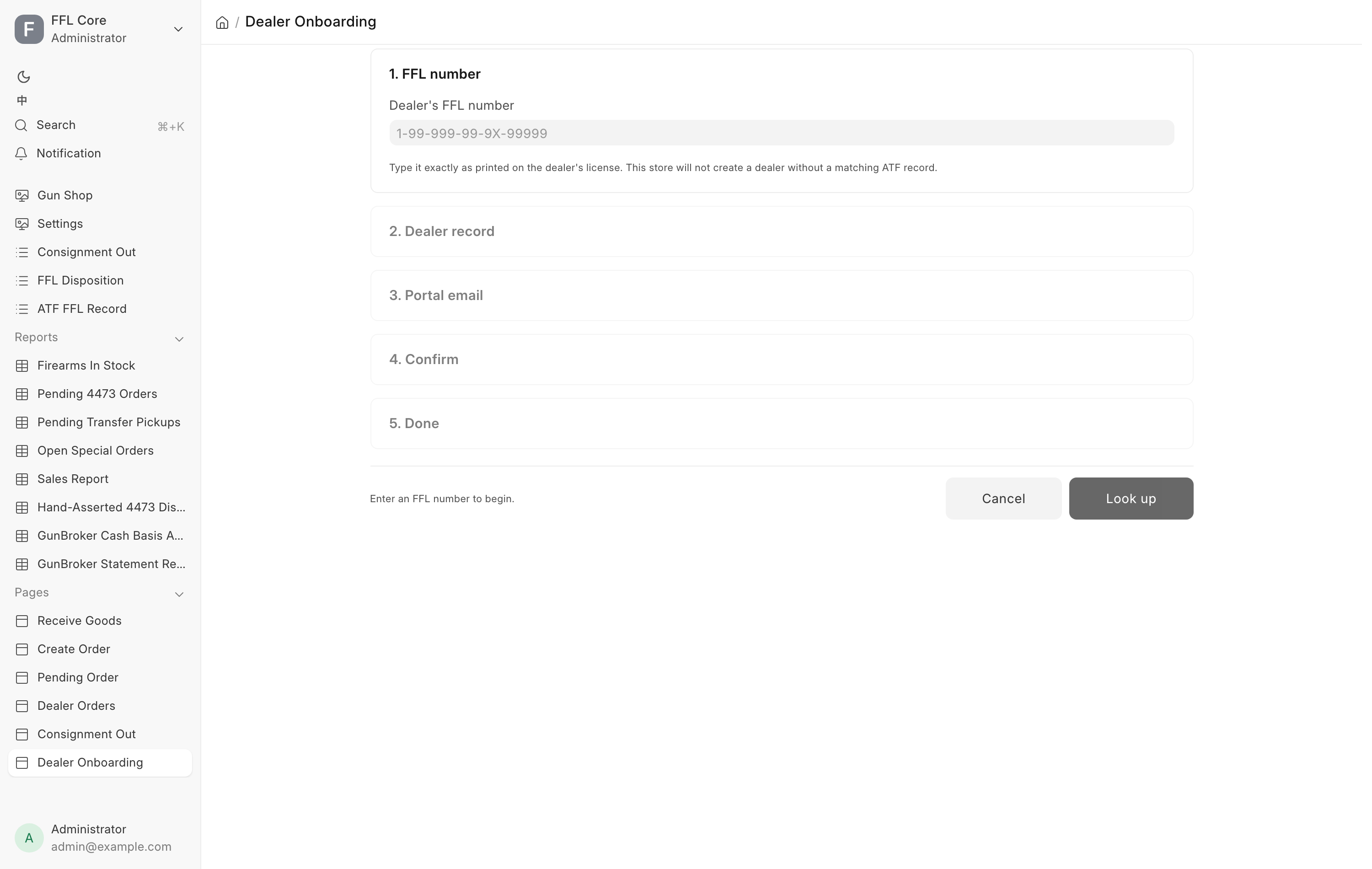
- In the sidebar, click Consignment → Dealer Onboarding, or go to
/app/osa-dealer-onboarding. You need the Sales Manager, Stock Manager or System Manager role. - The OSA Consignment extension must be on. If it is off, the page says so instead of showing the wizard. See Consignment.
- Have the dealer's FFL number in front of you, copied from their license.
- Agree a store mailbox with the dealer, something like
store@partner-guns.com. It becomes the login name of the API user their POS reports with. Do not use an employee's personal address. It has to survive staff turnover at their store. - Find out whether the dealer runs this same POS with the consignment extension. If they do, you will swap credentials with them on the last step. If they do not, you can still ship to them. See A dealer without our POS.
You can also reach this page from the Consignment Out page. Pick + New dealer… at the bottom of the dealer dropdown, and when you finish the wizard it offers to take you straight back to the shipment you were building.
Steps
All five steps live on one screen, stacked. Finished steps collapse to a summary line with a Change button.
- Type the dealer's FFL number into Dealer's FFL number exactly as printed on their license, then click Look up. The check is a digit count, not a strict format, because a real FFL carries a letter in one segment.
- Read the Dealer record card. It tells you which situation you are in. See the table below. When the wizard is building a new dealer, you can edit Store name here. That is the name your staff will see in the dealer dropdown, and changing it does not touch the ATF licensee name.
- Click Continue, then type the store mailbox into Email and again into Confirm email. Type the second one from the dealer's own writing rather than pasting the first, so a typo cannot survive.
- Click Continue and check the Confirm summary. Tick I've checked this email address — it is the dealer's.
- Click Create dealer & open API login. For a dealer who already exists in your system, the button reads Open API login instead.
- On the Done — connect the two POSes step, read the Created card, then hand over and record the credentials. See Connecting the two POSes.
- Click Done to leave, or Ship to this dealer → to jump to the Consignment Out page with this dealer already selected.
What the lookup can find
| What the card says | What it means | What happens next |
|---|---|---|
| Already in your system — nothing to create. | A customer record carries this FFL, with no API login yet | Continue. The next steps open their API login. |
| This dealer already has its API login. | The customer and its login both exist | Steps 3 and 4 read "Nothing to do". Step 5 opens, so you can connect the POSes or issue a new secret. |
| From your ATF file | No customer yet, but the license is on file | Continuing creates the dealer from that ATF record. |
| Fetched from ATF eZ Check just now | No customer and no local record, so the license was looked up live | Continuing creates the dealer from what came back. |
| No ATF record for … | The ATF has no such number | The wizard stops. Nothing is created. Click Change number and check it against the license. |
| Couldn't reach ATF eZ Check. | The lookup service is unavailable right now | Click Try again in a moment. Nothing was created. |
For an existing dealer the card also shows two status lines. API login reads the masked login with Active, or none yet. Partner POS reads the address with Configured, or none with You mark its sales.
An outage is not a rejection
"Couldn't reach ATF eZ Check" and "No ATF record" mean different things. The first means the check did not happen. Never treat it as proof the dealer's license is bad, and never refuse a shipment on it.
Connecting the two POSes
The Done step has two cards. Each store gives the other one login.
Their API credentials — shown once. This card lists Login, API key and API secret. It appears only when the wizard opened a new login. Give all three to the dealer. They enter them on their own POS under Consignment In → Connect a consignor store. The secret cannot be shown again. If it is lost, issue a new one.
Partner POS — where consignments to this dealer are pushed. The dealer's store creates a login for you on their POS, and their Connect a consignor store dialog shows its key and secret. Fill these in:
- Partner POS URL: their POS address, for example
https://pos.partner-guns.com. The site only, no page path. - API key (our user on their POS): the key they read you.
- API secret: the secret they read you. Once a secret is stored, you can leave this blank to keep it.
- Click Save. The card reads "Saved. Test the connection, then this dealer can be shipped to."
- Click Test connection. A good answer reads "Connected — their POS knows us as" and names the user. Anything else shows the error in red.
You can also enter or correct these later on the dealer's customer record, in the Partner POS (OSA Consignment) section.
Issue new secret for their login replaces the secret of the dealer's login. It asks first, because their POS stops working with the old one until they enter the new pair. The new credentials print on the card, once.
A dealer without our POS
Leave the Partner POS card empty. It reads "Not configured — you can still ship to this dealer; you mark its receipts and sales on its card." Their card on the Consignment Out page shows No POS — you mark its sales, and you record what they tell you with Mark received and Mark sold. See Shipping a consignment.
The wizard still opens an API login for them. It sits unused unless they later run our POS.
One login belongs to one dealer
Before anything is created, the wizard refuses an email address that is already spoken for, and names where it went so you do not repeat a typo:
- The address already logs in for another dealer. The message reads "… already belongs to … One login, one dealer — use a different address."
- A contact record already carries that address for another dealer.
- The address belongs to some unrelated account in the system.
Click Change email and pick a different store mailbox. Do not repoint an existing login at a second store. Every report from a login attached to two dealers is refused with "Your account is not linked to exactly one dealer."
What the system does
Everything below happens in one transaction. If any part fails, all of it rolls back, so there is never a half-built account to clean up. Re-running the wizard on the same FFL and the same email heals and links rather than duplicating.
- Creates the dealer's Customer record, or reuses the one that exists, linked to the ATF FFL Record for that license.
- Creates a User as a Website User carrying only the OSA Consignment Dealer role, and issues its API key and secret.
- Creates or repairs a Contact holding that login, linked to the dealer's Customer.
- Sends no email.
The OSA Consignment Dealer role is API only
The role the wizard assigns has no Desk access and no permissions on any record
type. The only thing its login can do is report receipts and sales of that
dealer's own consignments. A dealer who tries any /app address is refused.
Never add another role to a dealer login
Adding any second role to that user breaks the isolation the whole channel depends on, and can give a partner dealer a view of your inventory, your customers and your bound book.
The dealer's custody warehouse
The wizard does not create a warehouse. The first time you dispose a shipment to
this dealer, the system creates one for them automatically, named
Consignment Out - <dealer>. Guns you send them live in that warehouse, so your
stock reports show them as still yours but not on your shelf. On the balance
sheet the warehouse points at a Stock at Consignee asset account, which keeps
"guns sitting at a partner FFL" as its own line rather than blending into stock
in hand.
That warehouse's account is set once, at creation, and cannot be repointed after it has stock movements without a full accounting repost. Do not edit it.
Closing a dealer down
To stop a dealer's POS reporting to you, open that login's user record and clear Enabled. To stop pushing to their POS, clear Partner POS URL on their customer record. When their staff changes, nothing needs doing: the login belongs to the store, not a person. If the secret may have leaked, use Issue new secret for their login on the wizard's last step.
To end the relationship completely, bring every remaining At Dealer gun home first. See Shipping a consignment. A dealer's warehouse cannot be disabled while it still holds stock.
Troubleshooting
| Message you see | What it means | Fix |
|---|---|---|
| That doesn't look like an FFL number. | Fewer than nine digits typed | Retype it from the license. |
| Couldn't reach ATF eZ Check. | The verification service is down | Click Try again shortly. Nothing was created. |
| No ATF record for … | The ATF has no such license | Check every digit. A dealer cannot be created without an ATF record. |
| … already belongs to … | That email is another dealer's login | Use a different store mailbox. |
| That contact is already linked to another dealer. | A contact holds that address elsewhere | Use a different address. |
| … is already in use by another account. | The address belongs to an unrelated account | Use a different address. |
| This FFL is expired. | The license on file has lapsed | You can open the account. You cannot ship until it is renewed. See Verifying an FFL. |
| Enter the partner POS as a full URL, e.g. https://pos.example.com. | The address is not a web address | Type the full address, starting https://. |
| Enter just the partner POS site, without a page path | The address has a page on the end | Keep only the site part the message shows. |
| The partner POS must be https:// | The address starts http:// |
Use the https:// address. |
| No answer. | Test connection reached nothing | Check the address and the key and secret with the dealer, Save, then test again. |
| Couldn't create the account. Nothing was created — try again. | The create step failed | Tick the confirmation again and retry. |
| Couldn't issue a secret. | The new secret was not made | Try again. If it repeats, ask a System Manager. |
| Your account is not linked to exactly one dealer. | The dealer's POS reports with a login tied to zero or two dealers | A System Manager checks the contact behind that login. It must link to one dealer. |