Selling a firearm
Counter staff, every time a gun leaves the store to a private buyer. The register will not let the sale finish until the Form 4473 and the background check are recorded, so most of this page is about that gate and the ways through it.
Before you start
- You need Sales User, Sales Manager or System Manager. An Accounts User can open the register but cannot run or record a 4473.
- The gun must already be received and in stock, with a Serial No record. If it is not, book it in through Receive Goods first.
- The order needs a named customer. The 4473 will not start without one.
Federal recordkeeping. Nothing on this page replaces the 4473 itself or the background check. The system records that they happened and writes the bound-book disposition. The form still has to be filled in correctly and filed.
Ring the gun
- Pick the customer at the top of the cart.
- Scan the barcode on the gun, or search for the model and click the product card.
- If the card shows a price range rather than one price, the model is priced per gun. Open the cart line and pick the serial of the gun in your hand. See Point of Sale for how that picker works.
- Add anything else the customer is buying. Ammunition and accessories ride on the same ticket.
- Click Checkout.
Transfer (4473) is not this
The purple Transfer (4473) button on the cart, above Checkout, is for a different situation: a gun the customer already owns, shipped to this store by another dealer. The store runs the 4473 and charges only a transfer fee. The gun is never sold, so it goes on the ticket at $0.
Use the normal flow on this page when the store owns the gun and is selling it. Use Customer transfers when the customer already owns it.
The 4473 button on the payment screen
Once you click Checkout, a wide colored button appears above Complete Order. It is the 4473 for this order and its label tells you where the order stands.
| Label | Color | What it means |
|---|---|---|
| FastBound 4473 | Grey | Nothing started yet. Click it to begin. |
| Awaiting 4473 | Orange | Started in FastBound, not finished coming back. |
| 4473 Complete | Green | Form completed and NICS Proceed. The order can complete. |
| Record Paper 4473 | Grey | This store keeps paper 4473s. Click to record one. |
| 4473 Recorded | Green | The paper 4473 has been recorded on this order. |
| 4473 Not Configured | Red | Neither route is switched on. A manager has to fix a setting. |
A small square button with a circular arrow sits beside it. Its tooltip is Refresh 4473 status. It is not there in Paper 4473 Mode, because there is nothing on the other end to ask.
Running the 4473 in FastBound
- Click FastBound 4473. The Start FastBound 4473 dialog opens with one dropdown per firearm on the ticket, listing the in-stock serials for that model.
- Confirm the serial for each gun.
- Click Open FastBound. A FastBound tab opens.
- In FastBound, click Start New 4473.
- Scan or type the serial, fill in the buyer's details, and have the customer sign in FastBound.
- Click Save & Commit in FastBound.
Back at the register, the order is parked as a Draft and a fresh cart opens so you can serve the next customer. NICS can take minutes or days, and the register is not held hostage to it.
When you are ready to finish, click Recent Orders, set the status filter to Draft, open the order and click Complete Order.
If a firearm on the ticket has no in-stock serial, the dialog says so for that row and Open FastBound stays disabled. Receive the gun before selling it.
Payment before the 4473
Store policy allows the money to be collected while the 4473 and NICS are still pending, and the main button on the payment screen says what its click does:
| Button | When | What a click does |
|---|---|---|
| Take Payment | The 4473 has not cleared and the order is not fully paid | Takes the payment, then parks the order |
| Paid — waiting for 4473 | The order is paid in full and the 4473 has not cleared | Checks the 4473 again; completes the order if it has cleared |
| Save — waiting for 4473 | The trade-ins come to more than the sale, so the store will pay the customer | Saves the order; nothing is paid out until it completes |
| Complete Order | The 4473 has cleared, or there is no firearm | Completes the sale |
When you take the payment and the 4473 has not cleared, you see Payment taken — order held for 4473 and the order stays a Draft. On a ticket where the store pays the customer you see Order saved — waiting for the 4473 instead.
The message tells you what to do next, and it differs by configuration:
- FastBound running. Click FastBound 4473 to run it. Once the dealer commits the disposition, reopen the order from Recent Orders with the status filter on Draft and click Complete Order.
- Paper 4473 Mode. Complete the paper form and the background check, then click Record Paper 4473 and Complete Order.
- Neither. The message names the two settings a manager can change.
A denied buyer
The gun does not go out. A manager reverses the money and then deletes the draft: Void Card Charge for a card, or return the cash. See Taking payment.
Finding a parked order
Three ways back to an order waiting on a 4473:
- At the register, Recent Orders with the status filter on Draft.
- On the Dashboard, the Open 4473s card. Its Ready tab holds the orders whose NICS came back Proceed, and Complete on a row opens that order.
- The Pending 4473 orders report, under All records on the Dashboard, which lists every parked firearm order with its 4473 and NICS status, how long it has waited, and the Brady third business day.
When a NICS result lands on a sale, the bell rings for Sales User, Sales Manager and System Manager: Proceed, Delayed or Denied, and again when a delayed check clears. Click the notification to open the order. See Notifications.
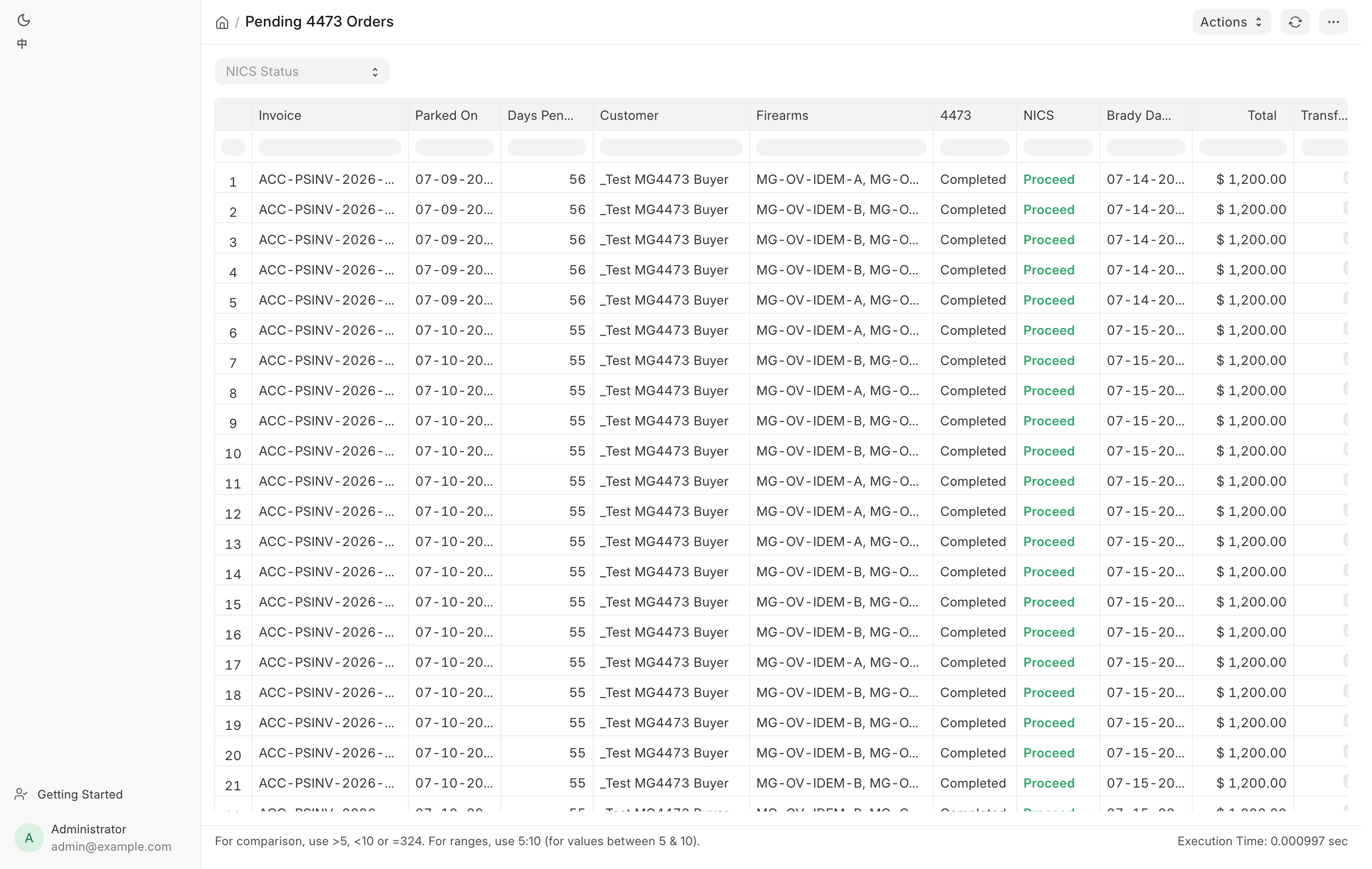
Work it every morning. Daily checks covers what each column means.
Refresh 4473 status
Click the circular-arrow button when the badge still says Awaiting 4473 but you believe the 4473 is done. It re-reads the order, repairs the order's status from the store's own disposition records, and only then asks FastBound.
| What it tells you | What it means |
|---|---|
| The 4473 is complete and you can Complete Order | Ready to finish |
| The order was out of date and has been corrected | The status had drifted. It is now right |
| FastBound has not sent the completed 4473 back yet | Still genuinely waiting |
| Could not reach FastBound, local records only | Network or FastBound problem. Try again |
| FastBound already shows this firearm as disposed | FastBound disposed the gun but no completed 4473 synced back. FastBound does not expose the NICS outcome, so a manager must confirm NICS Proceed and use the override |
| No serial on this order yet | Click FastBound 4473 to start |
| No firearm on this order | No 4473 is needed |
Paper 4473 Mode
If your store runs 4473s and background checks on paper, a manager turns on Paper 4473 Mode in FFL Settings. The counter then records a 4473 instead of starting one, and the button reads Record Paper 4473.
- Complete the paper 4473 and the background check off-system.
- Click Record Paper 4473.
- Read the confirmation. It asks you to confirm, for every firearm on the order, that the ATF Form 4473 is completed and signed, that the background check came back Proceed, and that the form is filed with your records.
- Click Yes — 4473 completed.
- Click Complete Order.
This is an attestation
Confirming books a bound-book disposition for every gun on the ticket under your name, and it cannot be undone from the counter. Your ATF recordkeeping duty is unchanged. This setting only tells the register not to wait for FastBound.
The setting takes effect on the next page load. A till that was already open keeps acting on the old setting until it is reloaded.
No 4473 route configured
If FastBound is switched off and Paper 4473 Mode is not on, the button turns red and clicking it opens No 4473 route configured. Nothing at the counter fixes this. A manager has to turn on FFL Settings → Paper 4473 Mode if the store keeps paper 4473s, or turn FastBound Settings → Enable FastBound back on.
For a single order, a manager can still use Manager Override 4473, which works in this configuration.
Manager override
When the 4473 and NICS were genuinely completed in FastBound but never synced back, a Sales Manager or System Manager can force the sale through with Manager Override 4473 on the POS Invoice in the desk view. The button is also offered when the clerk ran the 4473 straight in FastBound without the register's button, so the order's 4473 status still reads N/A, as long as the order has a firearm on it. See Manager override for when it applies and what it books.
Redo 4473
If an order already has a completed 4473 and it has to be redone, clicking the green badge says so and offers Redo 4473 to a Sales Manager or System Manager.
- Void the disposition in FastBound first.
- Click Redo 4473.
- Tick I have already voided this disposition in FastBound.
- Type a reason and confirm.
The order's retail-sale dispositions are cancelled and the 4473 status is cleared, so the refresh button cannot bring the old status back. Start a new 4473 when you are ready. After a redo, recording a paper 4473 or a manager override for the corrected form records the sale again, so the order can be completed, even on an order first sent to FastBound. The old form shows as cancelled in the 4473 records. Without the tick, the system tells you to void in FastBound first and stops.
What the system does
- Blocks Complete Order until the 4473 status is Completed and the NICS status is Proceed. The gate is enforced on the server, so no screen can go around it.
- Writes an FFL Disposition for each gun on the ticket when the 4473 is recorded.
- Pushes that disposition to FastBound.
- Consolidates a firearm invoice the moment the sale completes. Ordinary POS sales wait for the nightly close before stock and the ledger post. A firearm invoice does not: it is consolidated into a Sales Invoice immediately, so the serial leaves inventory at the instant of the sale rather than hours later. That is a compliance requirement, not a performance tweak.
- Keeps every completed 4473 as a permanent row in the 4473 records, with the store's own copy of the signed PDF. View Signed 4473 on the POS Invoice opens it.
- Takes the gun off the web store the moment the sale completes.
- Emails the buyer once if a Delayed background check later comes back Proceed. See Customer transfers.
Troubleshooting
| Message you see | What it means | Fix |
|---|---|---|
| Payment taken — order held for 4473 | Money is recorded, the 4473 is not | Finish the 4473, reopen from Recent Orders → Draft, click Complete Order |
| Order saved — waiting for the 4473 | The store will pay the customer once the 4473 clears | Finish the 4473, reopen the draft, click Complete Order |
| 4473 already complete | The order already has a completed 4473 | Nothing to do, or a manager uses Redo 4473 |
| No 4473 route configured | FastBound off and Paper 4473 Mode off | A manager changes one of the two settings |
| Customer required | No customer on the order | Pick the customer, then start the 4473 |
| No firearms in this cart — 4473 is not needed. | Nothing on the ticket is a firearm | Complete the sale normally |
| No in-stock serial for an item on the dialog | The gun is not booked in | Receive it through Receive Goods |
| Pick the gun | A per-gun priced firearm has no serial or no price | Open the cart line and pick the serial |