FastBound
FastBound holds the electronic bound book. This system writes to it whenever a gun is received or leaves, and reads back from it when a Form 4473 completes. A manager owns the settings; counter staff meet it through failure messages.
What syncs
Out of this system, automatically:
| Event | What goes to FastBound |
|---|---|
| A firearm is received | One acquisition per gun, with the source contact |
| A gun ships to another licensee | A disposition of type Dealer Transfer, FFL Transfer or Return |
| A gun is destroyed | A disposition of type Scrap or Destroyed, with both witnesses |
| A record is cancelled | A delete for the matching FastBound record |
| Firearm details are edited on a gun in the book | An in-place edit, after you confirm |
| A serial is corrected | An in-place serial edit, in the same transaction |
Each acquisition carries the date, the acquisition type, a note naming the
receive source, the source contact and one item. The item carries manufacturer,
model, serial, caliber and type, plus SKU, UPC, MPN, importer and cost. The
serial's own values win over the item's, and importer comes from the serial
only. A blank in any of the five required fields is sent as the literal
Unknown, which is why Receive Goods makes you
confirm them.
Into this system, from FastBound:
A retail sale's disposition is never pushed. It comes back the other way. When a 4473 completes, FastBound calls the webhook, and the system stamps the held order with the 4473 status and the NICS outcome, mints the bound-book disposition for each covered gun, and unlocks the till. It also writes the 4473 record and keeps a private copy of the signed PDF. See Form 4473 and NICS.
Retail Sale, Sale, Private Party Transfer, Donation, Gunsmithing and
NFA are never pushed automatically.
Settings and buttons
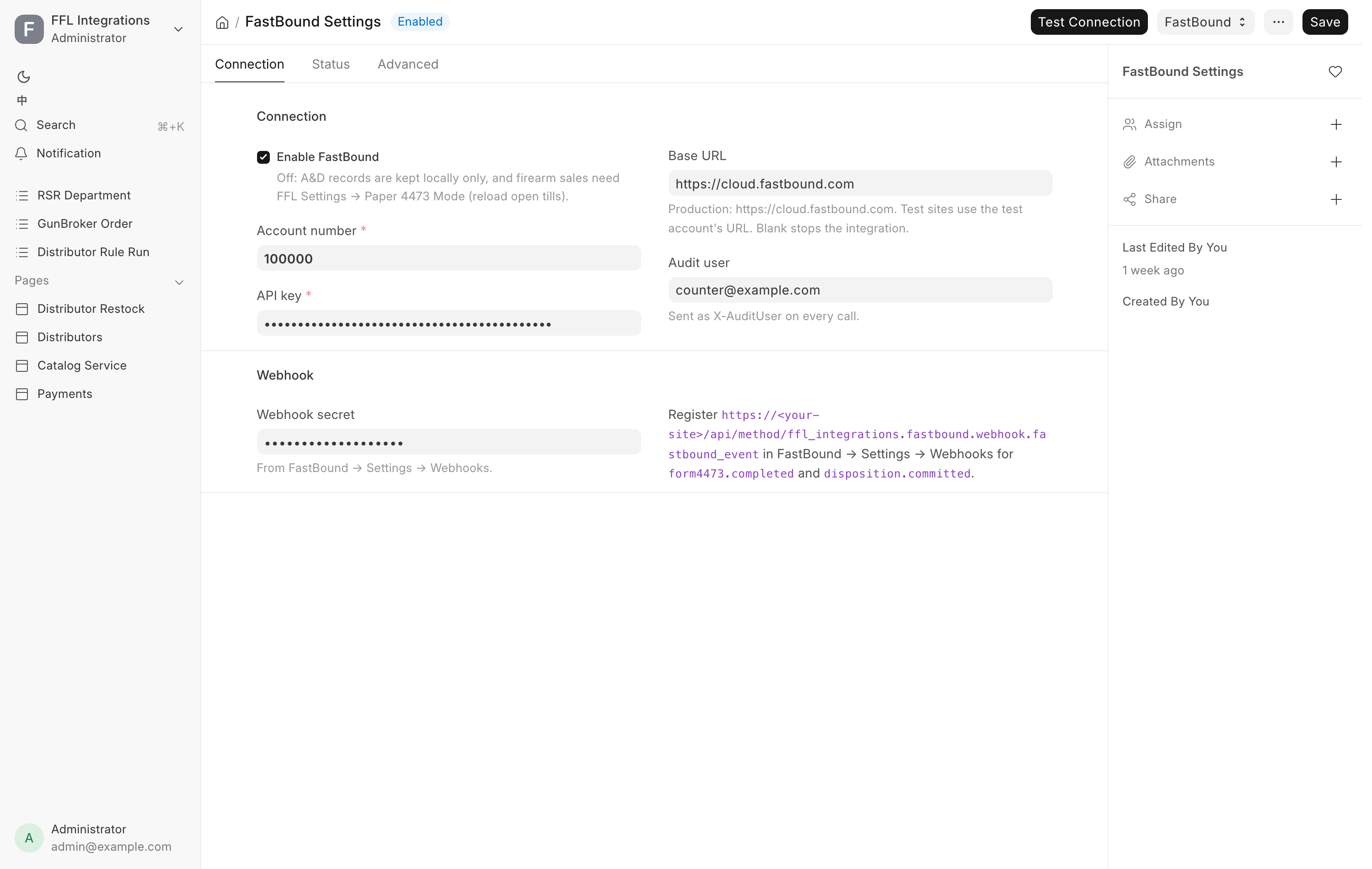
FFL Settings and FastBound Settings are separate. The FastBound Settings form carries the connection.
Enable FastBound is the master switch. Its description: "Off: A&D records are kept locally only, and firearm sales need FFL Settings → Paper 4473 Mode (reload open tills)." With it off, the three buttons below do not appear at all. With it on, Test Connection sits on the toolbar, and Sync FastBound Lists and Import Bound Book are under the FastBound menu beside it.
The rest of the form is the account number, the API key, the base URL, the audit user and the webhook secret, with the last import and the cached type lists on its Status tab. Integration settings covers every field.
Test Connection
Confirms the credentials work. On success a green message reads "FastBound
connection OK. Account: FastBound is not configured: ... or FastBound API error: ....
Run it after changing the account number, the key or the base URL.
Sync FastBound Lists
Refreshes the acquisition-type and disposition-type dropdowns from your FastBound account, so the choices on FFL Acquisition and FFL Disposition match what your account actually offers. On success: "Synced N acquisition + M disposition type(s) from FastBound." It also runs on its own once a day.
Run it after adding a custom type in FastBound.
Import Bound Book
A one-off migration. It pulls every item from your FastBound bound book and mirrors them into this system as items, acquisitions and stock receipts. Items already imported, matched by their FastBound id, are skipped, so running it twice is safe.
Save the form first, or you are told to. The dialog offers:
- Aggregate By, either
autoormodel.autogroups by SKU, then UPC, then MPN, then manufacturer and model.modelignores SKU, UPC and MPN and always groups by manufacturer, model and caliber. Pickmodelwhen your distributor SKUs are noisy. - Page Size, how many items to fetch per request. Default 100.
- Dry Run, which counts what would be imported and writes nothing.
Click Start Import. A large book takes several minutes. The importer commits after every successful item, so a crash part way through does not lose work. The result dialog reports Fetched, Created (or Would create), Skipped (already imported) and Errors.
Do a dry run first.
The webhook
FastBound calls a URL on this site when something happens there. Register it in
FastBound under Settings → Webhooks, for the events form4473.completed and
disposition.committed. The URL is printed on the FastBound Settings form itself,
beside Webhook secret, with <your-site> standing for your site's address.
Deliveries are signed, and the Webhook secret must match the one FastBound shows. A wrong or missing signature is refused.
form4473.completed stamps the held order with the 4473 result and the NICS
outcome, unlocks the till, books the disposition for each gun, and emails the
buyer when a previously delayed check has proceeded. It also writes or updates
the 4473 record, whatever the NICS result and whether or not
it matches an order here, and queues a private copy of the signed PDF. Copies
that miss are retried every hour.
Each NICS result that lands on a sale rings the notifications bell of the counter's 4473 roles. See Form 4473 and NICS.
disposition.committed confirms the disposition, and also catches a gun disposed
directly in FastBound's own screen with no sale here. Such a gun is issued out of
stock automatically, except when it is on an open order, out on consignment, or
part of a 4473, which raise an alert and hold the gun instead.
Failed pushes and stuck records
A push failure does not lose the record. It parks it.
Where the error shows. The FFL Acquisition or FFL Disposition carries FastBound Sync Error with the reason, in FastBound's own words. A record is waiting when it is submitted and its FastBound ID is empty. It is stuck when the sync error is not empty.
What retries on its own. A daily job re-enqueues every submitted record with
no FastBound ID, and a second daily job retries deletes that failed. Both skip
records whose error begins [TERMINAL], because those need a person. Records a
person has marked [NOT A&D] are never pushed or retried. See
A record that does not belong in the bound book.
Where you see it. The Dashboard's A&D block shows today's Acquired and Disposed counts and Not logged: records submitted more than 15 minutes ago that FastBound does not have yet. Under it, "N retrying · N need a person" splits them. Review N not logged opens Not in the bound book yet, listing each Record, its State (Will retry or Needs a person) and its Last error. Click a record to open it. The button shows only to someone who can read both acquisitions and dispositions. With FastBound switched off, the block reads FastBound off. See the Dashboard.
Where you are told. A push FastBound refuses for good rings the
notifications bell of every
Stock Manager, Sales Manager and System Manager: "A&D book: FastBound refused
A daily digest also emails the alert recipients set in FFL Settings, or every System Manager when that is blank. The subject reads:
[POS Alert] N FastBound record(s) stuck unsynced
Each line names the record and its error, and a line beginning [needs human]
marks a terminal failure that will not be retried.
Receiving is the exception. The push during Receive Goods is synchronous and atomic. There is no stuck state, because a rejection undoes the whole receive:
FastBound rejected this firearm, so nothing was received — fix the issue and
receive again.
Read the reason, correct the firearm details or the supplier's FFL, and receive again.
What to do when a push fails
- Open the FFL Acquisition or FFL Disposition named in the alert and read FastBound Sync Error.
- Fix what it names. A missing manufacturer or caliber is fixed on the gun. A rejected FFL number is fixed on the receiving dealer. See Verifying an FFL.
- If the error says the gun is already disposed in FastBound, do not push again. Either the transfer is already recorded there, in which case the two records need linking rather than a second push, or it is wrong and should be voided in FastBound. Both are manager work.
- If the error says the serial is not found in FastBound, its acquisition never landed. Fix that first.
- Cancel and amend the record if the details themselves were wrong. Cancelling a
record whose gun is still in stock warns you: "Serial
is still in stock. If this gun is leaving the books entirely, cancel its Material Receipt too; if you are amending the record, submit the amendment now." - If the record should never have been in the bound book at all, do not push it again. A Stock Manager or System Manager marks it instead, as below.
A record that does not belong in the bound book
Sometimes a submitted acquisition or disposition should never have been in the A&D book, and FastBound rightly refuses it. The usual case is an antique booked by mistake: FastBound never acquired the gun, so it refuses the record, and the record waits on the Dashboard's Not logged list for good.
A Stock Manager or System Manager who has checked the record can mark it as not in the bound book. The record is not cancelled, because its stock entry is right. It drops off the Not logged list, the daily retry and the stuck digest.
Only for records that never belonged in the book
Marking a record stops it ever reaching FastBound. Use it only when you have confirmed the gun is not a regulated firearm the store must book, such as an antique. A regulated gun's record must be fixed and pushed, never marked.
There is no button for this on any screen. It is done through an AI assistant connected to the POS's Full MCP Server (Settings → MCP Settings), signed in with your own POS account. See The MCP server. The store assistant on the desk cannot do it, because it has no tool that writes to the bound book.
- Open the FFL Acquisition or FFL Disposition and read FastBound Sync Error. Confirm the record does not belong in the bound book, for example that its item is marked Antique.
- Ask the assistant to mark it, naming the record type, the record and your
reason. It calls
ffl_integrations.fastbound.reconcile.mark_not_in_bound_bookwithdoctype(FFL AcquisitionorFFL Disposition),nameandreason. - Reopen the record. FastBound Sync Error now reads
[NOT A&D]followed by your reason, and a comment records who marked it and the error it had before.
If the record turns out to belong in the bound book after all, ask the
assistant to call ffl_integrations.fastbound.reconcile.clear_not_in_bound_book
with the same doctype and name. The sync error is emptied, the daily retry
pushes it again, and the Dashboard lists it until it lands. A comment records
who cleared it.
Both calls are written to the Connector Audit Log with your user.
Checking the two books agree
Both tools live on the Firearms In Stock report, under Compliance → Firearms in stock in the sidebar. It opens for Stock User, Stock Manager and System Manager.
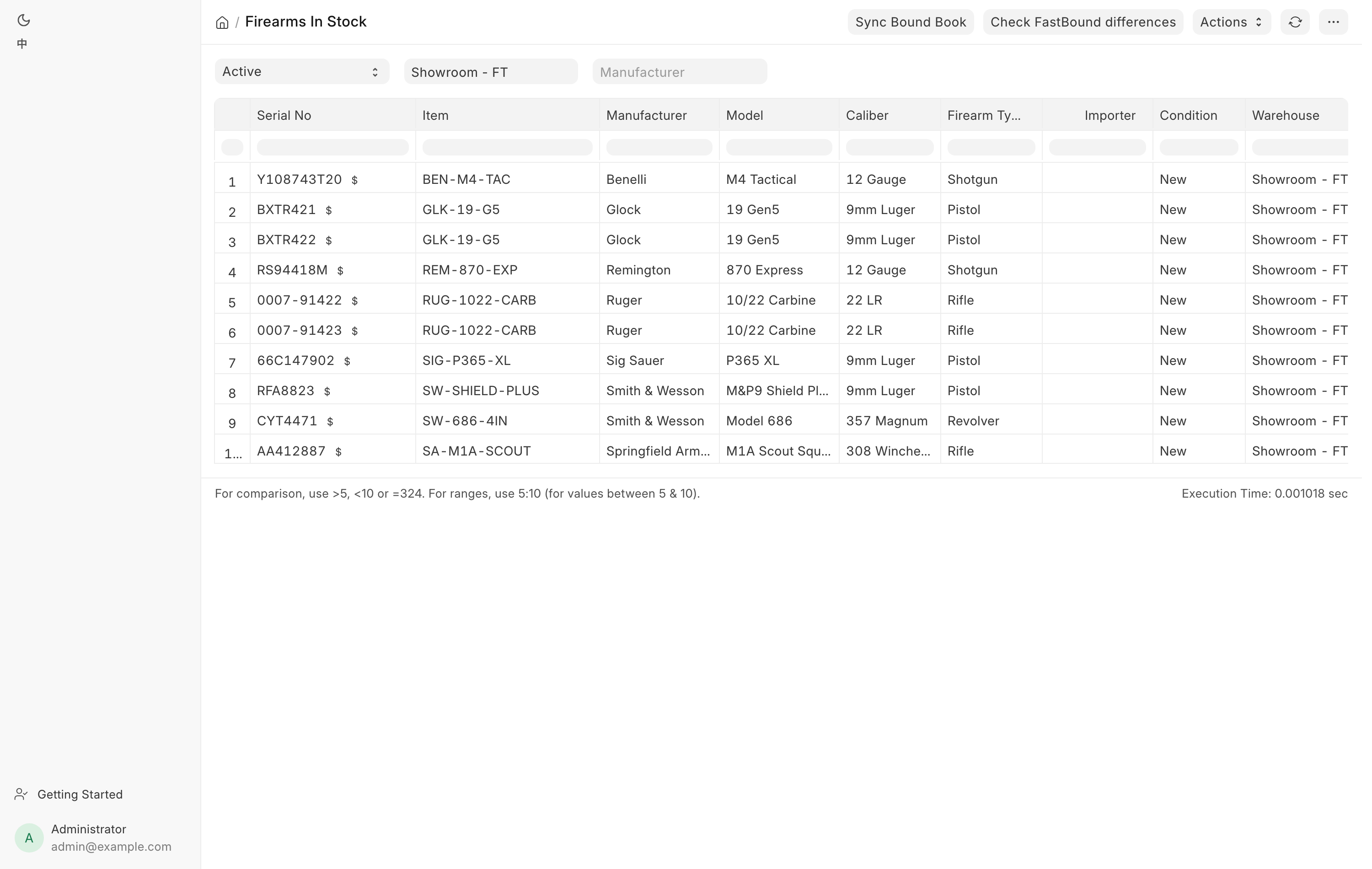
Check FastBound differences
Compares every in-stock gun's manufacturer, importer, model, caliber and firearm type against the bound book. It runs in the background and reports when it finishes.
If everything matches: "All in-stock firearms match FastBound."
If not, the summary is titled "FastBound Scan: N gun(s) differ" and says: "Open each gun's Serial No and use 'Sync with FastBound':" followed by each serial and the fields that disagree.
On the gun, Sync with FastBound opens Reconcile with FastBound, listing each differing field with the two values and a choice of Use FastBound or Use POS. Use FastBound corrects this system. Use POS pushes your value into the bound book. Click Apply.
A gun with no FastBound link at all offers to match it by serial number instead. A gun FastBound shows as disposed is not field-synced, because the stock mismatch has to be resolved first.
Sync Bound Book
Finds guns that are in stock here but marked disposed in FastBound, usually because a sale was recorded there and never here.
It previews first. If there is nothing to do: "In sync — no in-stock firearm is marked disposed in FastBound." Otherwise it asks: "FastBound reports these N in-stock firearm(s) as disposed. Remove them from ERPNext stock (Material Issue)?" with the list. Confirming issues exactly the guns you were shown.
Guns out on consignment at a partner dealer are never removed. They are disposed in FastBound but still the store's stock, and the message says so.
This needs Stock Manager, Sales Manager or System Manager.
Troubleshooting
| Message you see | What it means | Fix |
|---|---|---|
FastBound is not configured: ... |
Account number, key or base URL is missing. | Fill them in on FastBound Settings, then Test Connection. |
FastBound API error: ... |
FastBound answered with an error. | Read the text. Usually the key or the account number. |
[POS Alert] N FastBound record(s) stuck unsynced |
Records failed to push. | Open each and read FastBound Sync Error. |
A line beginning [needs human] in that digest |
A terminal failure that will not be retried. | Fix it by hand. It will not clear itself. |
... firearm serial '<n>' not found in FastBound — was its acquisition pushed? |
The gun was never acquired in the bound book. | Fix the acquisition first, then retry the disposition. |
... is already disposed in FastBound ... and cannot be disposed again. |
The bound book already records this gun leaving. | Manager work. Link the records or void the FastBound entry. |
FastBound rejected this firearm, so nothing was received |
A receive was refused and rolled back. | Fix what the message names and receive again. |
| Buttons missing on FastBound Settings | Enable FastBound is unticked. | Tick it, or work in Paper 4473 Mode. |
| A bell notice "A&D book: FastBound refused …" | FastBound refused a push for good. | Open the record and follow What to do when a push fails. |
FastBound Sync Error begins [NOT A&D] |
A manager checked it and marked it as not in the bound book. | Nothing, unless it does belong. Then clear the mark. |
Say why this record is not in the bound book. |
The mark was asked for without a reason. | Give the reason. |
… is not a submitted record missing from the bound book — nothing to mark. |
The record is a draft, cancelled, or already in FastBound. | Nothing to mark. |
… is not marked as off the bound book. |
Clearing was asked for on a record with no mark. | Nothing to clear. |
Related pages
- The bound book for the records being pushed.
- Form 4473 and NICS for the retail-sale flow that comes back.
- 4473 records for every completed 4473 and its signed PDF.
- Corrections for Correct Serial and Reassign Item.
- Integrations.