Taking payment
How money is collected at the register, and what a manager can do when a card payment goes wrong. Counter staff need the first half. The rest is for managers.
Modes of payment
| Mode | How it settles | What you have to record |
|---|---|---|
| Cash | The drawer | Nothing |
| Credit Card | The Payroc terminal, when the integration is on | Nothing. The approval comes back from the terminal |
| Credit Card | A standalone terminal, when the integration is off | The approval code from the terminal receipt, if the store requires it |
| Zelle | The bank | The Zelle confirmation number, always |
| ACH | The bank | Nothing at the register. On a counter order, the ACH reference |
A sale can be split across several modes. Enter an amount against each one on the payment screen before clicking Complete Order.
Zelle
Every positive Zelle amount needs its confirmation number. When you click Complete Order the Zelle Transaction Number dialog asks for it. Dismissing the dialog cancels the checkout, so type the number from the customer's app or the bank and click Confirm. Without it the deposit cannot be matched to the sale later.
On a counter order — Create Order, Record Payment on the Pending Order queue, or the Balance due box on a pickup ticket — Zelle and ACH both need their reference in Transaction Number / Approval Code.
Card approval codes on a standalone terminal
If your store swipes cards on a terminal that is not connected to this system, and the store has switched on the requirement, the Card Approval Code dialog asks for the approval code printed on the terminal receipt for this transaction. Refunds are asked too, because a negative card line reverses revenue and sales tax and nothing else records that the money went back.
Never type a card number
The approval code is a short code, usually six to eight characters. It is not the batch number and it is not the last four digits. A value that looks like a card number is rejected, because a card number in an accounting record would turn the ledger into cardholder data.
A sale split across two cards has two approval codes, and the system asks separately for each line.
Charging a card on the Payroc terminal
With the integrated terminal switched on, clicking Complete Order runs the card before the sale is submitted.
- The Card payment dialog opens. Any card already captured on this sale is listed at the top.
- Charge this card is prefilled with the whole remaining card balance. Type a smaller amount to split the sale across more than one card.
- Click Charge.
- Waiting for terminal appears with the amount, and the customer dips or taps their card. Only the Cancel button in the dialog closes it, so a stray click cannot orphan the terminal.
- On approval a green message shows the authorization code, and the loop repeats until the cards cover the card portion.
When the order already has card money on it, for example a deposit or the first card of a split, the Credit Card tile says "Already charged … — enter only the amount to charge now." Type only today's charge in the tile, not the card total.
When the trade-ins on a ticket come to more than the sale, there is nothing to charge: the store pays the customer instead. See Point of Sale.
| What you see | What it means | What to do |
|---|---|---|
| Approved, with an authorization code | The capture landed | Carry on |
| Payment not completed with a decline reason | The card was refused | Try another card or another mode |
| Partial approval of part of the amount | The card only had part of it | A manager reverses the charge, then re-tender |
| Terminal timed out | Two minutes passed with no answer. The charge was cancelled | Retry |
| Terminal error, contact lost while waiting | The connection dropped. The charge was cancelled | Retry |
| Terminal error, could not start the charge | The gateway refused the request | Check the terminal, then retry |
Cancelling mid-charge is safe. If the customer's card raced through to approval anyway, the charge is recorded rather than stranded, and a manager can void it.
Two guards you may hit
Partial approval on file. An earlier attempt captured only part of the amount. That money is recorded and voidable, but the order is not paid. A manager voids it and the sale is re-tendered.
Charged amount mismatch. The card was charged one amount and the Credit Card line now totals another, which means the cart changed after the money moved. This happens most often on a held firearm order that was edited while it waited for a 4473. A manager voids the charge, then re-tender.
Card payments on a counter order
An order built on Create Order is a Sales Invoice, not a register sale, and its card payments run against that invoice in three places. Each one uses the same terminal flow as the register: Waiting for terminal, the customer dips or taps, and only Cancel closes the dialog.
| Where | When |
|---|---|
| Create Order, Charge via Terminal | Right after the order is created, for the amount in the payment box — the whole total or a deposit. |
| Pending Order, Record Payment with Credit Card | Any later payment against the balance. |
| The register, the Balance due box on a pickup ticket | The rest of the money when the gun is handed over. |
If the card was already taken on the Payroc Virtual Terminal, do not run the terminal again. In Record Payment or the Balance due box, tick Already charged on Virtual Terminal and type the approval code from the Virtual Terminal receipt in Transaction Number / Approval Code. On Create Order, untick Charge via Terminal and the Card Approval Code is asked for instead. If the store's terminal is not set up, the system says Terminal not configured and points you to the same tick box.
On approval the payment is recorded on the order as a Payment Entry whose transaction number is the terminal's reference, so the deposit reconciles against the batch. The order books first and the card second: a declined card, a customer who backs out, or a timed-out terminal leaves the order on account with nothing recorded, and you charge again or collect another way. Two attempts never run at once on the same order, and an approval that was interrupted before it was recorded is picked up and recorded on the next attempt rather than charged twice.
Every attempt is kept as a Payroc Terminal Payment record linked to the invoice, with the amount, the status, the card description, the terminal's reference and the Payment Entry it booked. Nothing in it is typed by hand. The list opens from Card payments in the sidebar's Sales group, which shows only while the Payroc terminal is switched on.
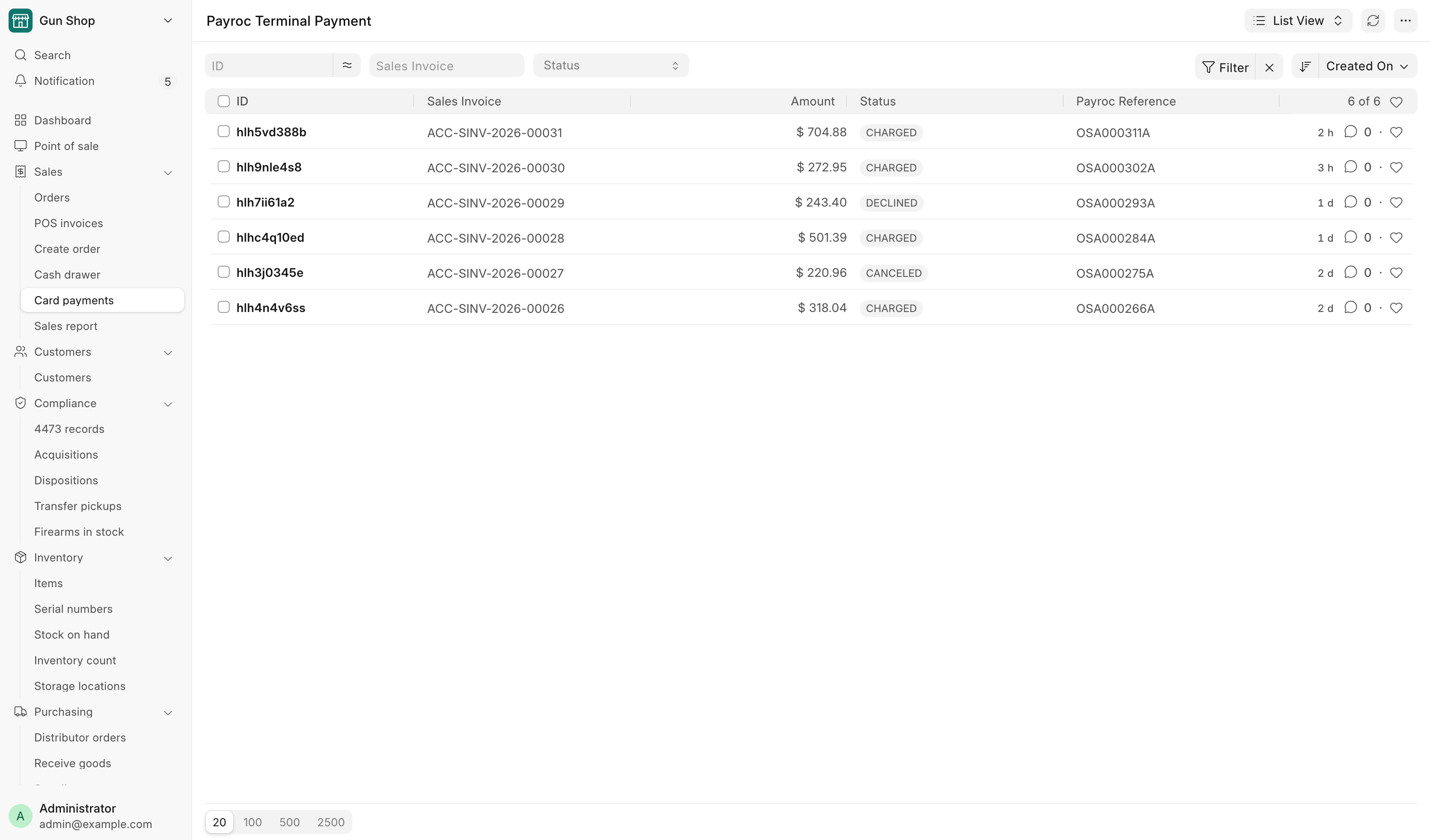
To give card money back on a counter order, use Card refund on its invoice. See Card refund on a counter order.
Saving a card to charge later
With the customer's signed authorization, a card paid at the terminal can be kept on file and charged later against a counter order's balance. It is off until a System Manager turns it on in the Payments hub. First create an agreement under Customers → Agreement templates that is Active and has Signed set to Per customer. Then, on the Card on file card, pick the Authorization the customer signs first, tick Offer "Save this card" and click Save. The card reads on, but the active processor cannot save cards when the processor cannot keep cards.
Saving the card. The customer must be a named customer, not the walk-in customer.
- In the Card payment dialog on the register, or Record Payment with Credit Card on the Pending Order queue, tick Save this card, then charge as usual.
- If the customer has not signed the card-on-file authorization, it goes to the signing tablet, or shows as a QR code. Waiting for the signature stays open for up to ten minutes. The card is charged once it is signed. Cancel goes back to the card dialog.
A green message reads Card saved for later charges. If the card was charged but could not be kept, Card charged but not saved says why, and the money stays recorded on the sale.
Charging it later. A Sales Manager or System Manager opens the counter order's Sales Invoice. While it owes money and the customer has a saved card, the Charge saved card button shows.
- Click Charge saved card.
- Pick the Card. Amount starts as the whole balance and cannot be more.
- Click Charge.
A decline books nothing and says Card not charged. If the processor never answers, the dialog reads Charge not confirmed. Do not take another payment for that amount. Click Charge saved card again in a few minutes and it looks the charge up. If the processor's portal shows no charge, click Release as not charged and write what you checked under What you checked in the portal.
The customer's saved cards are listed under Saved cards below Agreements on the customer. A manager can click Remove and give a reason. The processor forgets the card, and it can never be charged again. A card saved here is not used for membership renewals. A membership saves its own card when its first payment is charged with auto-renew. See Memberships.
The Payroc Charges table
Every card capture on an order is a row in the Payroc Charges table on the POS Invoice. A sale split across three cards has three rows. The single Payroc fields above the table are totals of those rows.
| Column | What it shows |
|---|---|
| Captured Amount | What that card actually took |
| Status | The state of that capture |
| Card | A safe description of the card used |
| Payroc Reference | The gateway's reference for the capture |
| Refunded Amount | How much of that capture has been pushed back |
| Attempt, Instruction ID, Gateway Response | Diagnostics for support |
Nothing in this table is typed by hand. It is written by the payment integration.
Manager actions on a card payment
All three of these are on the POS Invoice in the desk view, not on the register, and all three are limited to Sales Manager and System Manager.
Void Card Charge
Reverses an unsettled card capture and puts the money back on the customer's card. The main use is a held firearm order where the buyer was denied: void the charge, then delete the draft.
- Open the POS Invoice. The button is red and only appears on a Draft.
- If the sale was split across several cards, choose which charge to void. Only one is reversed per click.
- Type a reason, for example a NICS denial or a cancelled sale.
- Click Void the charge.
- Delete the draft, or re-tender the order.
Same business day only
A void works on an unsettled charge, before the batch closes. A settled or submitted sale has to be refunded through a POS return instead. Voiding a submitted sale would leave the books claiming a payment that no longer exists, so the button is not offered there.
Unlock Card Refund
A refund attempt that ended with an unknown outcome locks the return so it cannot be retried blindly. It may or may not have reached the customer's card.
- Check the Payroc portal first and confirm that no refund landed for this return.
- Open the return, click Unlock Card Refund, and write what you verified in the reason box.
- Click I verified in Payroc — unlock.
Unlocking re-arms a full-amount retry. If the first attempt did in fact land, the retry refunds the same money twice.
If the portal shows any refund landed, do not unlock. Send it to the back office instead. A lock that reports some slices already refunded is not unlockable at all: the remainder is settled by hand in the Payroc portal and reconciled on the return.
Confirm Portal Refund
When the card integration has been switched off but the original sale was charged through the terminal, this system cannot send the refund. The return is blocked until the portal refund is recorded.
- Issue the refund in the Payroc portal.
- Open the return and click Confirm Portal Refund.
- Enter the Portal refund reference, which is the refund's own reference from the portal, never a card number.
- Write what you verified, and click I refunded it in Payroc — record.
Recording it lets the return submit. It does not move any money.
Card refund on a counter order
A Sales Manager or System Manager can give card money back from the Sales Invoice of a counter order (Create Order). Open it. While it has a card charge with money left, the Card refund button group shows Void and Refund. This is separate from Void Card Charge on the register's POS Invoice, above.
Void gives back the whole charge before the processor settles it, usually the same day.
- Click Card refund, then Void.
- Pick the Card charge if there is more than one, and type the Reason.
- Click Void.
The invoice owes the amount again. If the processor says it has already settled, refund it instead. A charge that was partly refunded cannot be voided.
Refund gives back any part of what is left on a charge, settled or not.
- Click Card refund, then Refund.
- Pick the Card charge, set the Amount and choose the Type.
- Type the Reason and click Refund.
| Type | Use it when | What happens |
|---|---|---|
| Return / price lowered | Goods or service came back, or the price dropped | A credit note takes the amount off the sale, sales tax included, in proportion to the lines |
| Collect again | The sale stands and the money will come another way | The invoice owes the amount again. Sales and tax are unchanged |
A Return is refused on an order that sells stock items, carries a serial number or a delivery, or has a bound book entry. The dialog says why. Use Cancel Order or a sales return for those, or choose Collect again. The A Return refunds what the credit note comes to, which can be a cent off the amount you typed. If it is further off, the dialog says what to enter.
If the processor does not confirm a void or refund, the message reads Not confirmed. Do not try again, because the money may have moved. Look in the processor's portal, then click Card refund, Resolve card reversal. Under The portal shows, choose It happened — book it and type the Portal reference, or It did not happen — unlock. Write what you checked and click Resolve. Until then that charge cannot be voided or refunded.
The daily card charge check
A card charge can be voided or refunded outside the POS, on the terminal's own menu or in the Payroc portal, and the POS never hears about it: the sale keeps reading paid while the money never arrives. Once a day the system reads every card charge of the last week back from Payroc. Any charge Payroc no longer holds as captured gets a comment on its invoice, and the people on Alert Recipients in FFL Settings get an email titled [POS Alert] Payroc: … card charge(s) no longer captured at the gateway. With nobody on that list, every System Manager gets it.
The check only reports. Confirm with whoever ran the terminal what happened, then have the books corrected: collect again, or record the cash that replaced the card.
For the bookkeeper, a full list of every Payroc payment and refund for a date range, counter and web alike and matched to the POS, comes through the AI connector rather than a report. See Month-end close.
The Payments hub
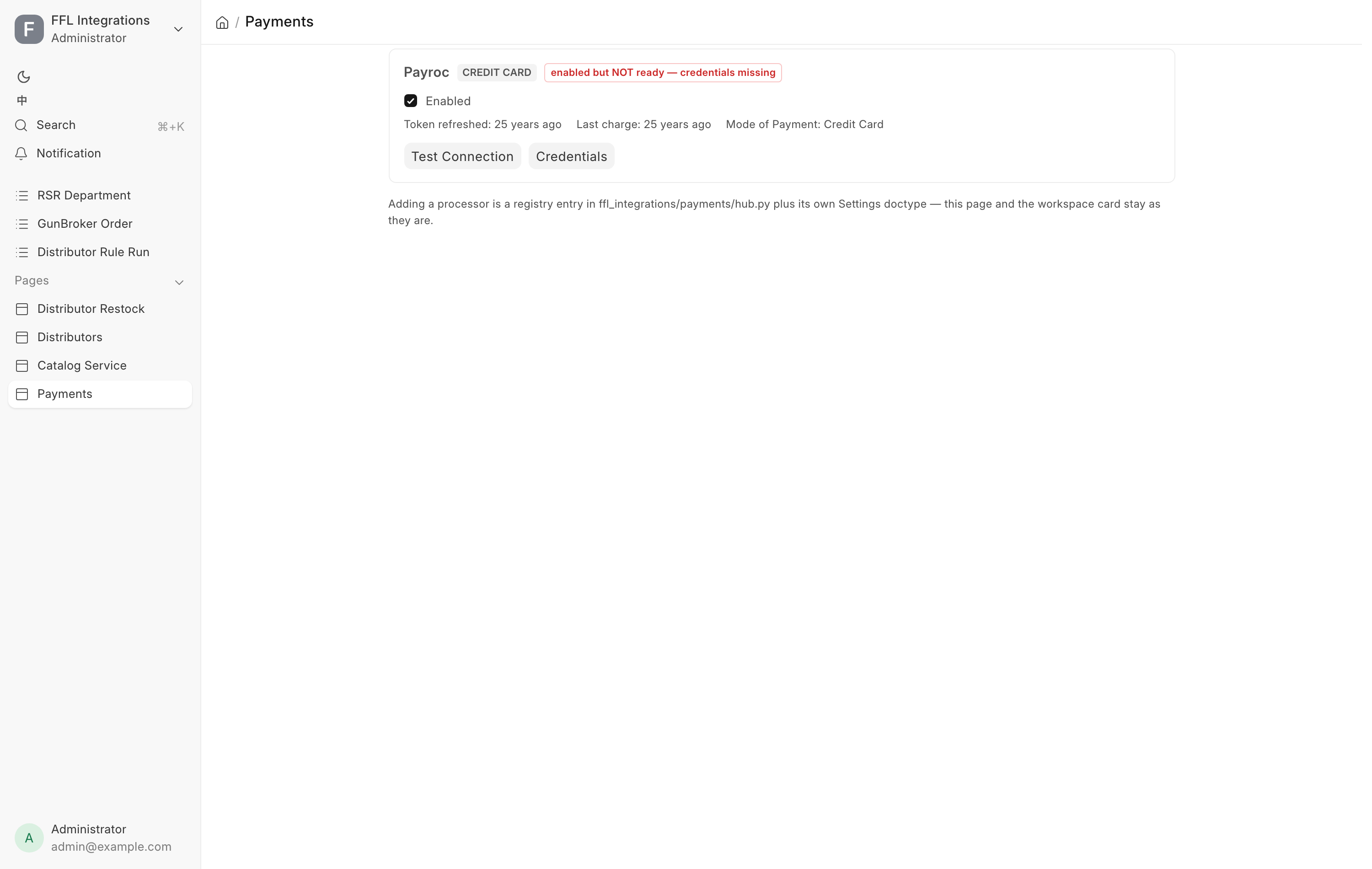
Open Payments (Credit Card) from the Settings workspace, or go to
/app/payment-hub. It is System Manager only, because the switch on it arms
live money movement.
Each processor card shows:
- Whether the integration is switched on.
- Whether it is ready, meaning switched on and holding credentials. A switch can be on while the key is missing, and the card says so rather than claiming it works.
- Token refreshed and Last charge, so you can see whether money is actually flowing.
- A connection test that authenticates against the gateway and reports what it found, including how many terminals the key is allowed to use and which terminal is set as the default.
- A link into the processor's own settings, where the credentials live.
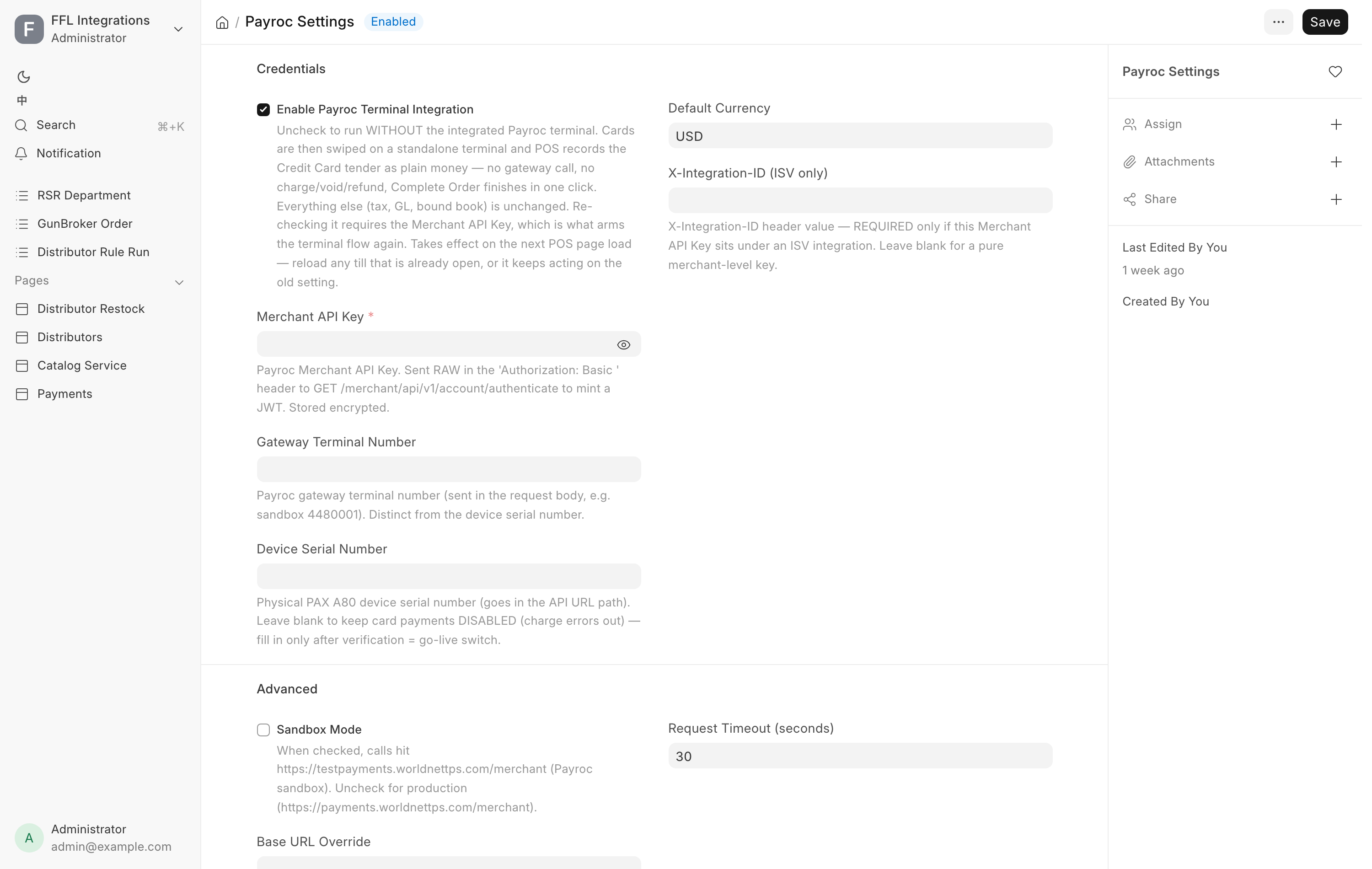
Switching a processor off is always allowed. Switching one on goes through the normal settings save, so a store cannot arm a processor it has no key for. With the integration off, Credit Card stays available as an ordinary mode of payment and the swipe happens on a standalone terminal.
GunBroker refunds are not done here
No screen in this system refunds a GunBroker order, and that is a design decision rather than a gap: GunBroker files the sales tax on those orders under its own license, so only a refund raised on their side moves the state filing with it. Refund on GunBroker first, then mirror the accounting here. See Returns and cancellations and Month-end close.