Distributor orders
Buying stock for your own shelf, and keeping an eye on everything on its way from a distributor. Purchasing staff search every house at once, build one cart, and create draft orders. A person confirms each order before anything is placed. When the goods arrive, they are received on Receive Goods or straight from the order.
Before you start
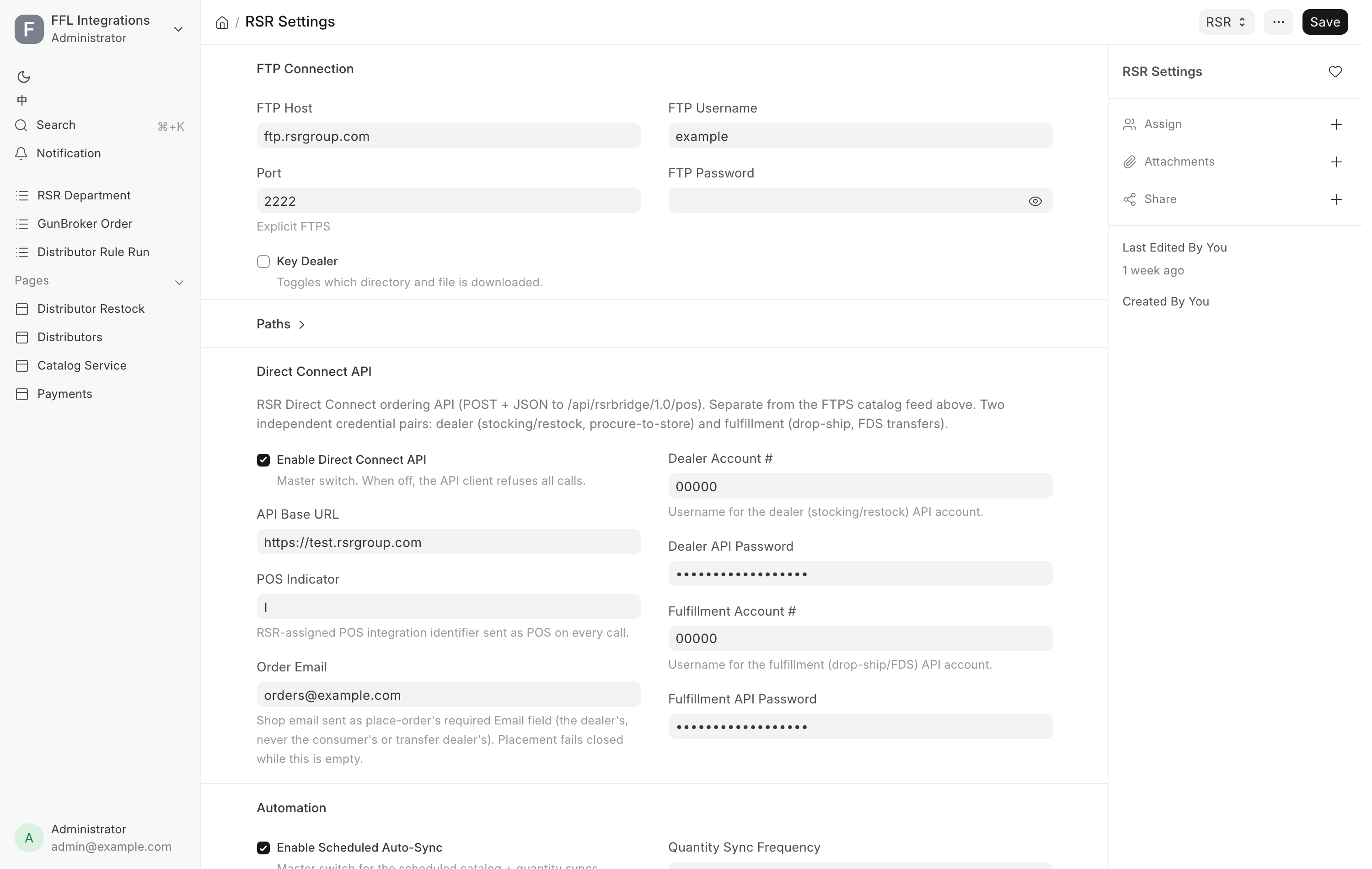
- A house needs Enabled and Stocking ticked on the Distributors hub to take a stocking order.
- The page opens for System Manager, Purchase Manager, Purchase User and Stock Manager. The same roles create, confirm and cancel orders.
- Receiving from an order needs Stock Manager or System Manager.
- Nothing on this page places an order by itself. Every order waits in Draft.
The Distributor Orders page
Open Sidebar → Purchasing → Distributor orders, or go to /app/distributor-restock. The page has two tabs: New Order for buying, and Track Orders for everything already ordered.
New Order
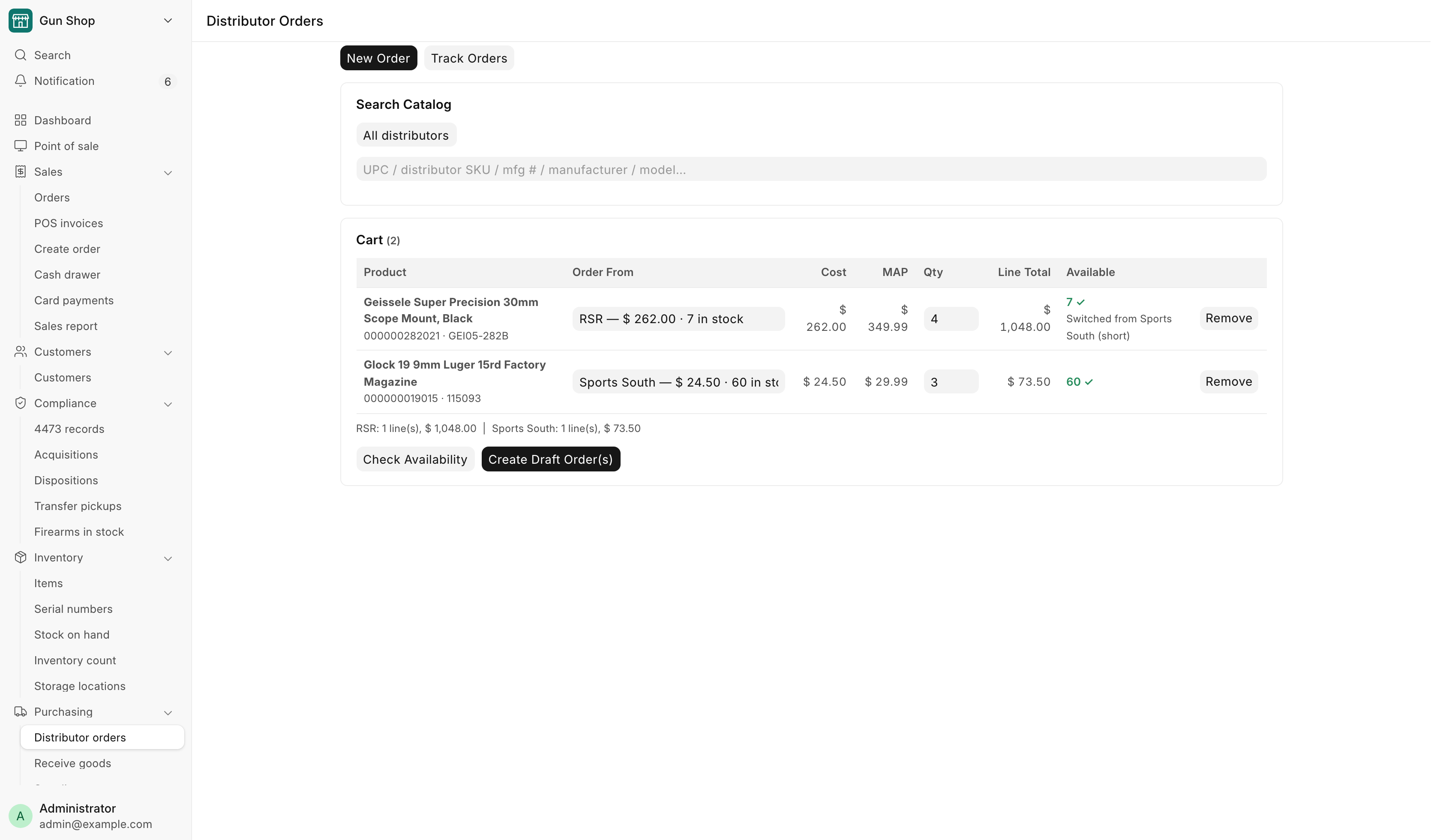
The tab runs down the screen: Search Catalog, then Cart. A third section, Created Orders, appears once you have made some.
Steps
- Type into Search Catalog. It searches every enabled house on UPC, distributor SKU, manufacturer number, manufacturer and model. Results appear after two characters. To search one house only, pick it in the box above the search, which starts on All distributors.
- Read the row. Each result shows a thumbnail, the name, an FFL tag when the item needs a license, and the UPC. The Distributor · Cost · Qty column lists every house that carries it, with its cost and how many it holds. The cheapest house that can fill one unit is in bold. MAP and MSRP follow.
- Set Order Qty and press Add. The line joins the cart. Adding the same product again increases the quantity already there.
- Check the house on each cart line. Order From starts on the cheapest house that holds enough for the quantity. Pick another house in the box to override it. Each choice shows that house's cost and stock.
- Press Check Availability. The system asks every house on the cart for live quantities and costs. Available shows the live count with a ✓ or a ✗. A line whose house is short moves to a house that can fill it, and reads "Switched from House (short)". You can switch it back. A line no house can fill stays where it was, marked ✗. This is a check, not a reservation.
- Press Create Draft Order(s). The cart is grouped by house and the orders are made. Created Orders lists each one.
- Press Confirm & Queue on each order, or Confirm & Queue All. That is the human gate. See Confirm and queue.
Under the cart, a totals line gives the line count and cost per house. MAP and MSRP are shown for judgement only. Nothing on this page clamps a price to MAP.
How the cart gets split
Create Draft Order(s) makes at least one order per house, and splits further where it must:
- Firearms and accessories never travel on the same order.
- A cart over 400 SKUs is chunked into several orders.
- Different lanes use different accounts at the house, so they are separate orders.
Orders made here are Stocking orders. Created Orders lists each one with Order, Distributor, Type, Account and Lines. Click the order name to open it. If one house refuses, its lines stay in the cart so you can fix them and try again.
Track Orders
Track Orders has two views, picked in the first box: Orders and Invoices. Refresh reads the view again.
Orders
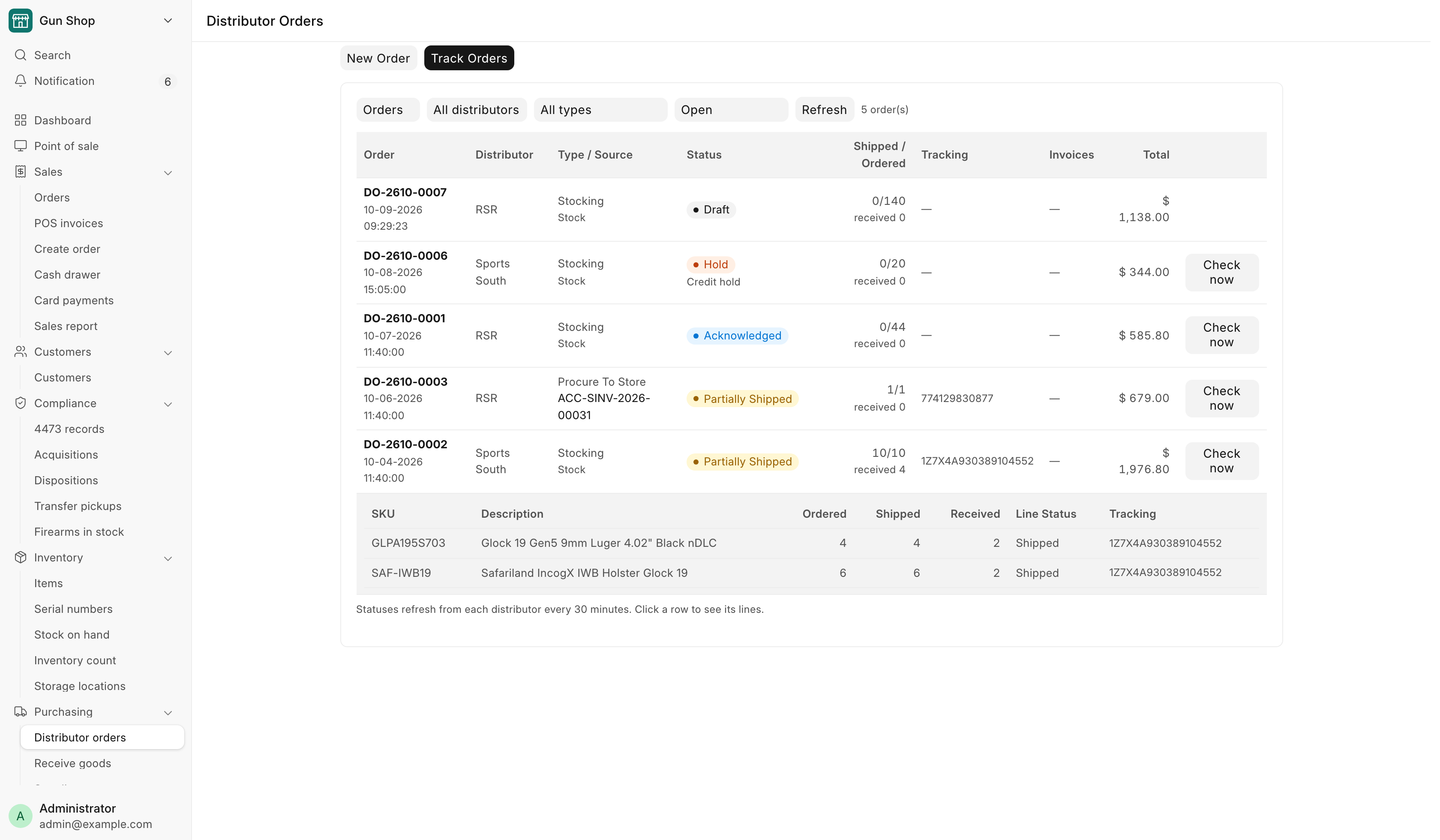
Every distributor order is here: stocking orders, ship-to-store orders for a customer, and drop-ship orders. Filter by house, by type, and by status. The status box starts on Open.
| Column | What it shows |
|---|---|
| Order | The order number, and when it was placed |
| Distributor | The house |
| Type / Source | The order type, and the sale it is for. Stock when it is for the shelf |
| Status | Where the order is. A held order shows the house's hold reason, and an order in Error its error |
| Shipped / Ordered | Units the house has invoiced against units ordered, and how many were received here |
| Tracking | Every tracking number the house has reported |
| Invoices | The house's invoice numbers |
| Total | The order's cost |
Click a row to see its lines: SKU, Description, Ordered, Shipped, Received, Line Status and Tracking.
Statuses refresh from each house every 30 minutes. A Stock Manager or System Manager can press Check now on a live order to ask the house at once.
Below the orders, Placed outside POS, not invoiced yet lists orders on a house's account that were placed somewhere else, such as the distributor's own website or a phone call. Only a house that can list its orders appears here (Sports South today). The table hides while you filter by type or by a single status.
Invoices
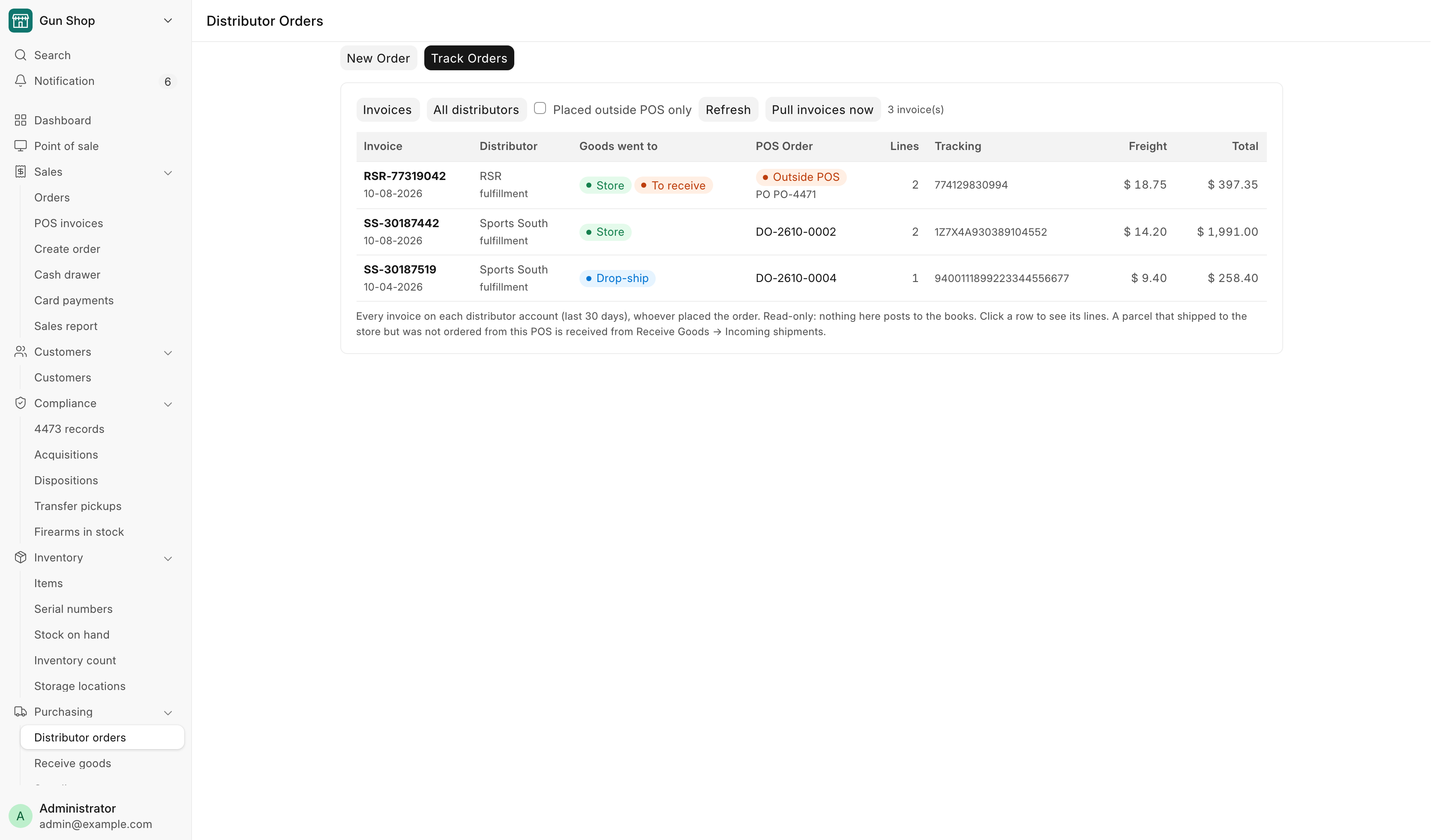
Every invoice on each distributor account from the last 30 days, whoever placed the order. The invoices are pulled from each house every hour. Pull invoices now asks at once. The pull runs in the background, so press Refresh a minute later. Tick Placed outside POS only to see only the ones no POS order matches.
| Column | What it shows |
|---|---|
| Invoice | The house's invoice number and date |
| Distributor | The house, and the account it was billed on |
| Goods went to | Store, Drop-ship or Unknown |
| POS Order | The matching distributor order, or an Outside POS pill |
| Lines, Tracking, Freight, Total | As billed. Fees show under the freight |
Click a row to see its lines, including the serial numbers the house shipped.
For a parcel that went to the store with no POS order behind it, Goods went to also says whether it was received here: Received or To receive. Receive it from Receive Goods → Incoming shipments, with Receive this parcel. See Receive Goods. An invoice marked "Likely POS order DO-… — awaiting link" is for the same products as an open POS order. The status poll links the two. Receive the order.
The Invoices view is read-only. Nothing here posts to the books.
The Distributor Order form
The order record carries the house, the order type, the account, the lines, the addresses, and everything the house has echoed back: invoice numbers, tracking numbers and serial numbers. It is not a submittable document. It walks a status field instead. Open it from Track Orders, from Created Orders, or from the Distributor Order list.
| Field | What it shows |
|---|---|
| Distributor, Order Type | The house and the lane: Stocking, Procure To Store, Dropship Accessory or Dropship Firearm |
| Account | The account at the house this order is placed on, as the distributor knows it |
| Distributor Order No. | The house's own number for the order. Status polls and holds are keyed by it |
| Fill or Kill | RSR orders only. Ticked, a line RSR cannot fill is dropped instead of back-ordered. Decided when the order is placed |
| Shipping service | The carrier service sent to the house, where the house offers a choice |
| Delivery options chosen at the counter, Signature, Adult signature, Insurance | Sports South orders only. The delivery options picked on Create Order |
| Status, Hold / Cancel Reason | Where the order is, and why it is held or was cancelled |
| Receive Status | Not Received, Partial or Received |
Each line carries the SKU, the quantities ordered, acknowledged, invoiced and received, the invoiced unit cost, and the invoice numbers, tracking numbers and serial numbers the house reported.
The buttons
| Button | Shown when | What it does |
|---|---|---|
| Confirm & Queue | Status is Draft | Asks you to confirm, then moves the order to Queued and hands it to the placement worker |
| Shipping service… | Status is Draft, and the house offers a choice | Picks the carrier service. The amount is an estimate until the invoice replaces it |
| Receive | A Stocking or Procure To Store order has a line invoiced by the house and not yet received here. Never on a drop-ship order | See Receiving what arrives |
| Check status now | The order is live at the house | Pulls the invoice, tracking and serials now, instead of waiting for the half-hourly poll |
| Update Transfer FFL | A Dropship Firearm order at Placed, Acknowledged or Hold, once the house has returned a reference | Replaces the receiving license to release a hold. The new license is checked again before the house is called |
| Cancel Order | Status is not Complete or Cancelled | Asks for a reason and marks the order Cancelled |
Update Transfer FFL and Cancel Order sit under an Actions menu.
Confirm and queue
Confirming is the moment the order becomes real. The dialog names the order and asks "Confirm and queue ... for placement?" because placement is not reversible on your side. The placement worker is idempotent, so a retry cannot place the same order twice.
An order raised from a counter sale may need the sale paid first. A drop-ship leg is refused until the counter order is paid in full. A ship-to-store leg may be placed on a deposit, because the goods land on your own shelf. The customer still pays the balance before taking the goods.
Cancelling after placement
Cancelling an order that is live at the house sets the status to Cancelled here and does not withdraw anything at the house. The cancel dialog offers a tick reading House has confirmed the cancellation (phone / email). Leave it clear and operations are alerted to arrange the cancellation with the house. Tick it once the house has agreed, and no alert goes out.
The status walk
| Status | What it means |
|---|---|
| Draft | Created and not yet confirmed. Nothing has been sent |
| Queued | Confirmed, waiting for the placement worker |
| Placed | The house has the order |
| Acknowledged | The house has accepted it and said what it will ship |
| Hold | The house is holding it. For a firearm order this is usually the receiving license. Use Update Transfer FFL |
| Partially Shipped | Some lines have shipped. More may follow |
| Complete | Finished |
| Cancelled | Ended without completing |
| Error | Placement failed. It may be queued again once the cause is fixed |
Live orders are polled every thirty minutes, backing off to every two hours per order, with an alert once an order has sat unchanged for fourteen days. RSR orders stay open until RSR has really shipped them, and the real tracking number appears when it does.
When the house ships a Stocking or Procure To Store order, the counter's notification bell rings: "House shipped DO-…", or "House shipped part of DO-…", followed by the customer's name when the order is for one. The house gives no arrival date, so the bell is the last word until the box arrives. The Dashboard's Arriving card lists the orders not yet fully received.
Receiving what arrives
Receiving is deliberately a staff action. Nothing is booked automatically, because booking a firearm into the bound book is a compliance act.
An order with a firearm on it is received on Receive Goods. Press Receive on the order, and Receive Goods opens with the order's lines staged. Confirm each gun against the firearm in hand and scan its serial number off the gun. The same orders are listed under Receive Goods → Incoming shipments. See Receive Goods.
An accessory-only order can be received from the order itself:
- Open the Distributor Order and press Receive.
- Read the preview. It lists each item and the quantity in this batch.
- Press Submit Receive Goods.
The receive books the stock. The Purchase Receipt name comes back in the confirmation.
An order can arrive over several shipments. Each receive books only what has been invoiced since the last one, and Received Qty on the line accumulates. Receive Status on the order reads Not Received, Partial or Received.
A line with no cost
Every line received from an order needs a Unit Cost above zero. The refusal names the SKU, and you fix it on the order line from the house's invoice. A genuinely free line cannot be received this way. Use the Receive Goods page, where a zero cost is confirmed with a reason.
When the order was raised to fulfill a paid web order, the guns you have now booked are attached to that order automatically, which clears it to be disposed.
Troubleshooting
| Message you see | What it means | Fix |
|---|---|---|
| Cart is empty. | Nothing to order | Search and add lines first |
| Can't order from House: distributor House is not enabled. | The house is switched off | Turn Enabled on in the hub, or order from another house |
| Can't order from House: ship to store is switched off for this distributor. | Stocking is off for the house | Turn Stocking on in the hub, or order from another house |
| Counter order … is not paid in full — record the balance from Pending Order before placing it with the distributor. | A drop-ship leg's sale still has a balance | Record the balance on Pending Order, then confirm |
| SKU X: firearm receive needs N serial number(s) from the distributor, got M. Receive it on the Receive Goods page and scan the serial off each gun. | The house did not send a serial for every gun | Receive on Receive Goods and scan each serial |
| No unit cost on N line(s) of this order: … | A line has no Unit Cost | Enter it on the order line from the house's invoice, then receive again |
| Distributor House has no Supplier set, so DO-… cannot be received. … | The house's record names no supplier | A manager sets Supplier on the Distributor record |
| Nothing new to receive. | Everything invoiced has already been booked | No action. Check Receive Status on the order |
| DO-… is a drop-ship order: the distributor shipped it to the buyer, so nothing arrives at the store to receive. | Drop-ship goods never enter your stock or bound book | No action. Nothing is booked |
| Distributor order short-shipped: DO-… (alert email) | The house shipped fewer units than you ordered | The cost invoice bills only what shipped. Refund the customer for the difference by hand. See Drop-shipping |